
Last Updated on May 26, 2026
AI Transparency VerifiedRemote work is evolving. Consequently, finding the right productivity tools is essential. Simplified AI offers an all in one workspace for freelancers and remote workers. Here, we will explore its user experience. First, we will look at the onboarding process. Next, we will check dashboard navigation. Then, we will discuss practical applications. Finally, we will review overall performance.
The Growing Need for Integrated Tools in the Remote Work Environment
Remote work is becoming the standard. Therefore, professionals want to consolidate their workflows. Imagine handling content, social media, and projects all in one place. This reduces the need to switch apps constantly. As a result, productivity increases. Additionally, your work becomes more organized. With the right tools, you can focus on what matters. Specifically, you can grow your business and serve your clients.
Introducing Simplified AI as a Potential Comprehensive Solution
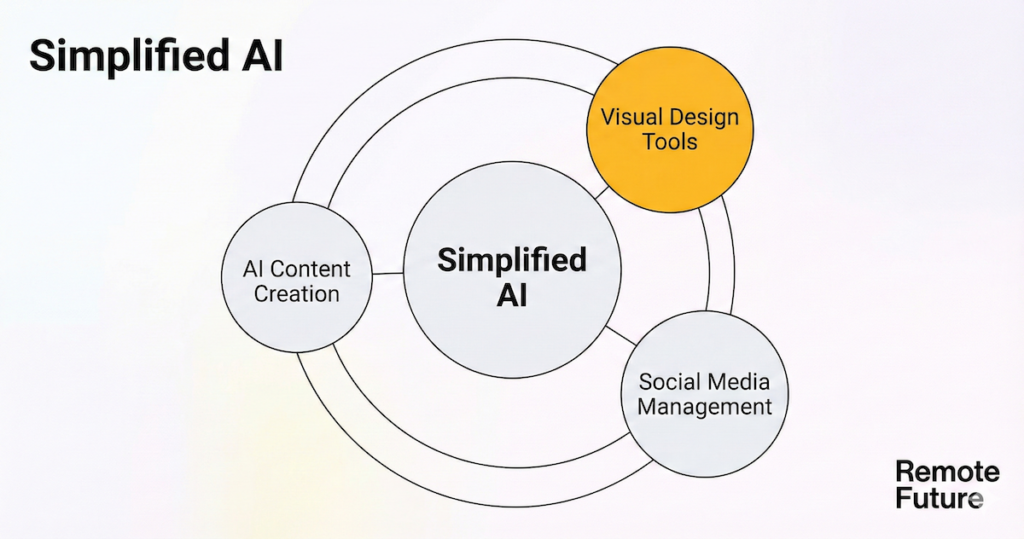
Simplified AI positions itself as an all in one tool. Specifically, it is designed for remote professionals. Indeed, it offers a suite of features for various needs. These include AI content creation, social media management, and design.
Consequently, this versatility is appealing. Freelancers and entrepreneurs often require a multifaceted tool. Therefore, by centralizing these functions, Simplified AI streamlines the workflow. Ultimately, this allows users to manage projects more effectively.
What This In-Depth Simplified AI Review Will Cover
In this review, we will examine the key features of Simplified AI. Specifically, we will see how they cater to remote professionals. Next, we will discuss the pricing structure. We want to know if it offers good value for money. Furthermore, we will explore the user experience. This significantly impacts how effectively you can use the tool.
Finally, we will compare Simplified AI with other market alternatives. Ultimately, this helps you make an informed decision for your remote work journey.
Our Commitment to Providing an Unbiased Perspective
At Remote Future, we pride ourselves on delivering unbiased reviews. Our goal is to empower you to make informed choices. Therefore, our analysis of Simplified AI will be thorough and impartial. We will focus on both the pros and cons. By presenting a balanced view, we aim to equip you with the right knowledge. This helps you navigate the complex AI landscape.
So, whether you are a freelancer or an entrepreneur, our insights will guide you. Ultimately, we help you make the best decision.
What is Simplified AI? A Core Overview for Remote Work
Remote work is gaining traction. Obviously, professionals seek tools to simplify workflows. Simplified AI is one such tool. It is an integrated marketing platform. Specifically, it caters to solo creators and small businesses. Therefore, this section explores its core promise. We will examine its features and benefits.
Above all, we will see how it supports distributed work environments.
Defining Simplified AI’s Central Promise
Simplified AI positions itself as an all in one marketing platform. Specifically, it integrates various functions into a single interface. The aim is to consolidate content, social media, and design. Thus, marketing becomes easier. You avoid the need for multiple tools. In fact, this is perfect for freelancers and small business owners. Often, they juggle many tasks.
Therefore, they need a cohesive solution. Ultimately, this streamlines their operations.
Aim to Consolidate Content Creation, Social Media Management, and Design Functionalities
One standout feature is the integration. Simplified AI brings content, social media, and design together. It puts them on one platform. Consequently, users can create content and schedule posts there. Additionally, you can design visuals in the same environment. This saves time. Moreover, it reduces the complexity of managing multiple tools. For instance, a small business owner can draft a blog. Then, they create graphics.
Finally, they schedule promotions without switching apps. As a result, focus remains high. Ultimately, productivity increases.
Supporting Solo Creators and Small Businesses in the Distributed Work Setting
Remote work brings unique challenges. Specifically, solo creators and small businesses have limited resources. Therefore, they need versatile tools. Simplified AI addresses these issues. It provides a user friendly platform. Crucially, it caters to various marketing needs. The platform understands that many users lack design backgrounds.
Thus, it is accessible to everyone. This inclusivity empowers users. Ultimately, you can control your strategy without technical overwhelm.
Initial Thoughts on Simplified AI Scope and Ambition
Upon exploration, Simplified AI reveals ambitious goals. Clearly, it goes beyond simple content creation. Instead, it aims to simplify complex marketing tasks. Often, these tasks deter creative individuals. By offering a comprehensive suite, the platform encourages confidence. It strives to be a centralized hub. This reflects a growing industry trend toward efficiency.
In conclusion, Simplified AI emerges as a promising solution. It is ideal for remote workers seeking better marketing results. By integrating essential functions, it supports solo creators. Additionally, small businesses can navigate digital marketing easily. As the landscape evolves, such tools are crucial. Ultimately, they empower professionals to thrive.
Diving Deep into Simplified AI Features for the Remote Professional
Remote work continues to shape the professional landscape. Consequently, specialized tools are becoming essential. Simplified AI stands out as a comprehensive platform. Specifically, it supports tasks from content creation to social media management. In this section, we will explore these key features.
Ultimately, they empower remote professionals to thrive in their roles.
Exploring the AI Content Creation Suite
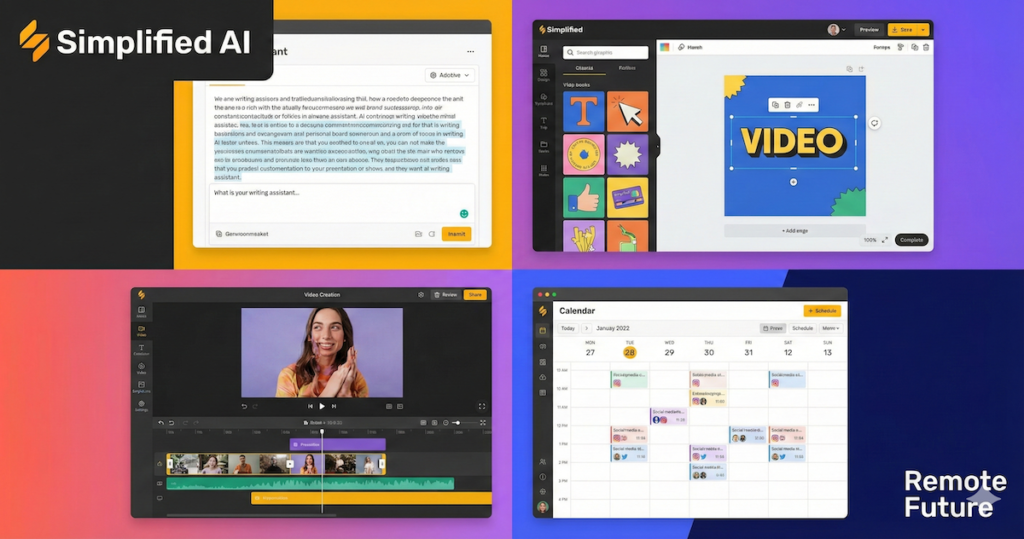
Simplified AI offers an impressive AI Content Creation Suite. Specifically, it includes an AI Blog Writer, Presentation Generator, and Faceless Video Generator. These tools are beneficial for remote creators. Especially those needing high quality content quickly. For instance, the AI Copywriter generates engaging articles. This allows writers to focus on refining ideas. Thus, you avoid starting from scratch.
Meanwhile, the AI Presentation Generator simplifies design. Therefore, communicating ideas becomes easier. Finally, the AI Faceless Video Generator adds versatility. You can create videos without being on camera. In fact, this is ideal if you prefer staying behind the scenes.
Reviewing Visual Content & Design Tools
For remote graphic designers, Simplified provides a robust suite of tools. Specifically, it includes an AI editor, image generation, and a brand kit. The AI editor allows for quick adjustments. Consequently, designers maintain a consistent aesthetic across projects. Furthermore, the image generation feature is particularly useful. It creates unique visuals for specific needs. Thus, saving time and effort.
Additionally, the brand kit helps remote teams. It provides easy access to logos and colors. Ultimately, this ensures all content aligns with the brand’s identity.
Examining Social Media Management & Scheduling
Social media managers will find Simplified’s tools invaluable. Specifically, the AI Social Post Generator creates engaging posts. These are tailored to different platforms. Consequently, you maintain a consistent online presence. Best of all, you save time on creation. Furthermore, the AI Carousel Generator adds value. It lets you create multi image posts. Thus, capturing audience attention is easier.
Additionally, scheduling capabilities assist remote teams. You can plan and automate content effectively. Ultimately, this ensures posts go live at the perfect time.
Discussing Collaboration and Workflow Tools
Collaboration is key for remote teams. Therefore, Simplified AI offers features that facilitate effective teamwork. Specifically, the platform includes tools like shared folders and collaborative editing. These help teams maintain consistency. Moreover, members can work together in real time. They can provide feedback and make adjustments instantly.
Thus, Simplified helps professionals stay connected. Ultimately, this leads to more cohesive project outcomes.
Simplified AI User Experience: A Practical Look at the All-in-One Workspace
Remote work is evolving. Therefore, finding the right productivity tools is essential. Simplified offers an all in one workspace. Specifically, it caters to freelancers and remote workers. In this section, we explore the user experience. First, we focus on the onboarding process. Next, we look at dashboard navigation.
Then, we discuss practical applications. Finally, we review the platform’s performance.
Onboarding Process and Initial Setup
Getting started with Simplified is straightforward. First, new users see a clean interface. It guides them through the initial setup. Next, the onboarding includes helpful prompts. These help you customize your workspace. While the learning curve is minimal, users may need some time. Consequently, you need to familiarize yourself with various features.
Fortunately, the platform provides tooltips and tutorials. Ultimately, this makes navigating the initial stages easier.
Dashboard Walkthrough and Navigation
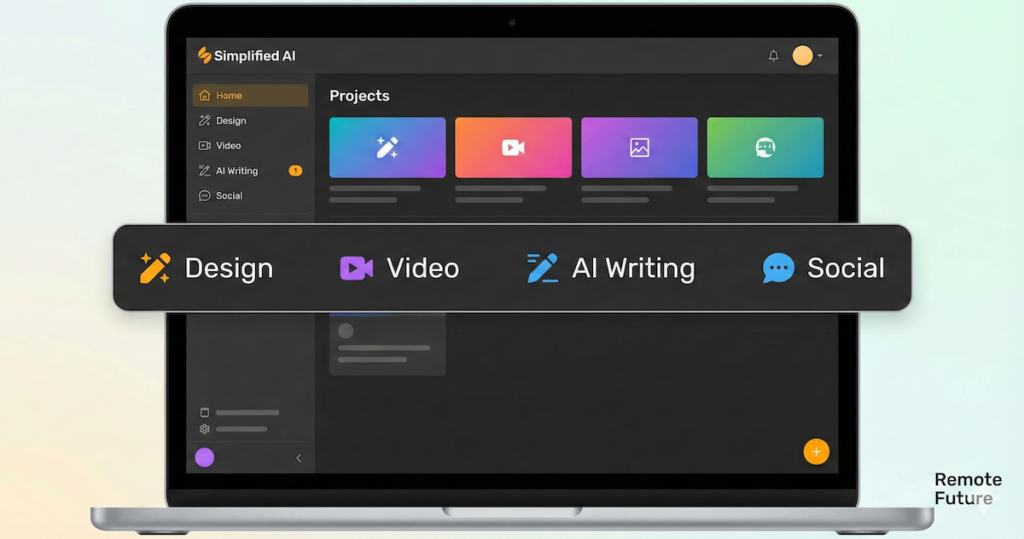
The dashboard is designed with user friendliness in mind. Upon logging in, you see a centralized hub. Here, you can access all tools. Furthermore, the navigation bar is intuitively organized. Consequently, you can switch between tasks easily. Move from content creation to scheduling in seconds. Each tool interacts seamlessly. Therefore, you manage daily tasks without switching apps.
This integration fosters a cohesive workflow. Ultimately, staying organized and productive becomes easier.
Practical Applications for Freelancers
For freelancers, Simplified AI is a valuable asset. For instance, let us consider a content creation project. First, a freelancer can use the AI tool to brainstorm ideas. Next, after selecting a topic, the AI assists with the outline. It can even suggest headings and generate intro paragraphs.
This approach not only saves time but also sparks creativity. Consequently, you can focus on refining your unique voice and style.
Assessing Platform Performance
Regarding performance, Simplified AI demonstrates great stability. In fact, it is commendably responsive. During typical use, the platform operates smoothly. Specifically, tasks like content creation and scheduling happen without lag. Consequently, you can switch between tasks seamlessly. This is crucial for maintaining productivity. Additionally, the platform is cloud based. Therefore, work saves automatically. This significantly reduces the risk of data loss. Overall, performance aligns well with freelancer demands. It provides a reliable workspace for various projects.
To conclude, Simplified AI offers a user friendly experience. Specifically, it caters to freelancers and remote workers. From onboarding to practical application, the design supports productivity. Moreover, it encourages creativity. As remote work evolves, reliable tools are key. An all in one workspace like Simplified AI makes a difference.
Ultimately, it helps you achieve your professional goals.
Simplified AI Pricing
Managing a remote business is complex. Therefore, choosing the right tools is critical. It significantly impacts productivity and collaboration. Simplified AI offers a range of pricing tiers. Specifically, they design these for various needs. They cater to everyone from freelancers to small teams. In this section, we will explore the different options. Next, we will analyze their value for money.
Furthermore, we will discuss potential cost savings. Finally, we will address limitations as your business grows.
Overview of Pricing Tiers
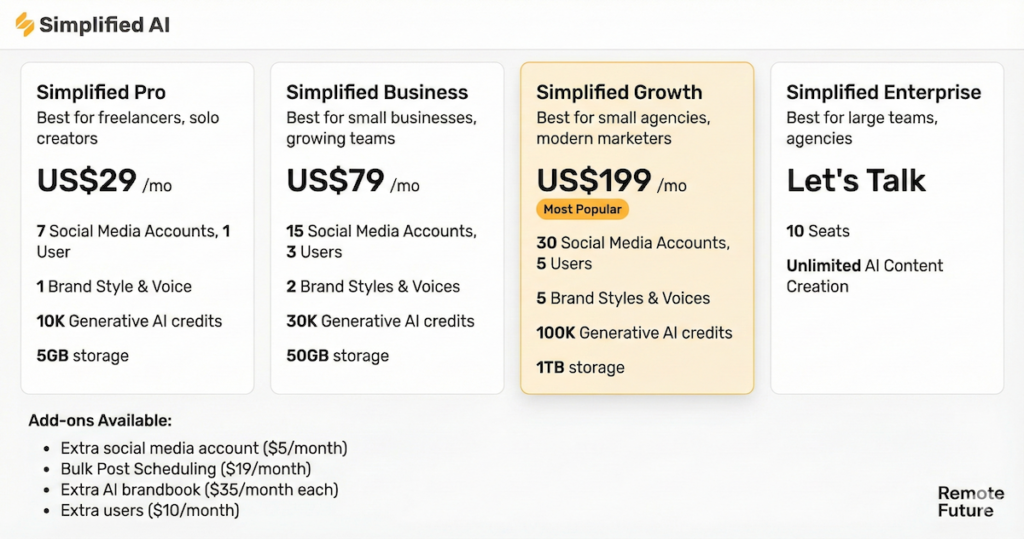
Simplified AI provides four main pricing tiers. Specifically, these are Free, Pro, Business, and Growth. First, the Free tier is an excellent starting point. It allows you to explore without financial commitment. You get basic features like AI content creation. Additionally, it includes social media scheduling.
Next, the Pro tier offers a competitive monthly rate. It expands on the Free tier with advanced analytics. Therefore, it is ideal for freelancers and small teams.
Finally, the Business tier suits larger organizations. It provides collaboration tools and custom branding. Ultimately, this helps businesses scale while maintaining brand presence.
The price for the Pro plan is $29 per month or $228 billed annually. Whereas, that of the Business plan is $79 per month or $588 billed annually. Finally, the price for the growth plan which is, by the way, the most popular, is $199 per month or $1788 billed annually.
Value for Money Analysis
When evaluating value, consider the features at each tier. For freelancers, the Pro tier is a compelling option. It combines essential tools at a reasonable cost. Additionally, you get access to advanced analytics. This helps you make informed decisions. Consequently, your marketing outcomes improve. Moreover, the Free tier is a huge plus. It allows you to test the platform first.
Therefore, it is a low risk option for beginners. Overall, the pricing fits various budgets. Ultimately, it provides valuable features that enhance productivity.
Cost Savings Through Tool Consolidation
Besides, one significant advantage is cost savings. Simplified AI consolidates multiple tools into one platform. Currently, many remote workers rely on various subscriptions. You might pay for content, social media, and project management separately. Therefore, by utilizing Simplified, you reduce this number. Consequently, this leads to substantial savings over time.
For instance, instead of paying for separate design, social, and writing tools, you access them all here. So, this consolidation saves money. Moreover, it simplifies workflows. Ultimately, you can focus on core tasks without the distraction of managing multiple accounts.
Simplified AI Potential Limitations and Additional Costs
Simplified AI offers robust features. However, you should be aware of limitations. Specifically, these appear as your needs grow. For example, the Free tier has restrictions. It limits the number of projects and templates. Consequently, this may not suffice for increasing demands. Additionally, as teams expand, gaps emerge. You may find the Pro tier lacks advanced features. Often, these are only available in the Business tier.
Furthermore, consider additional costs. Scaling your operations might require upgrades or add ons. Therefore, evaluating these factors is essential. Ultimately, you must ensure Simplified remains cost effective as your business evolves.
Simplified AI Pros and Cons
Remote work continues to gain traction. Therefore, finding the right tools is essential. Simplified AI offers a comprehensive suite of features. Specifically, it caters to the needs of remote workers. In this section, we will explore the pros and cons of Simplified AI.
Ultimately, we provide a balanced perspective for those considering this all-in-one tool.
Key Advantages of Simplified AI
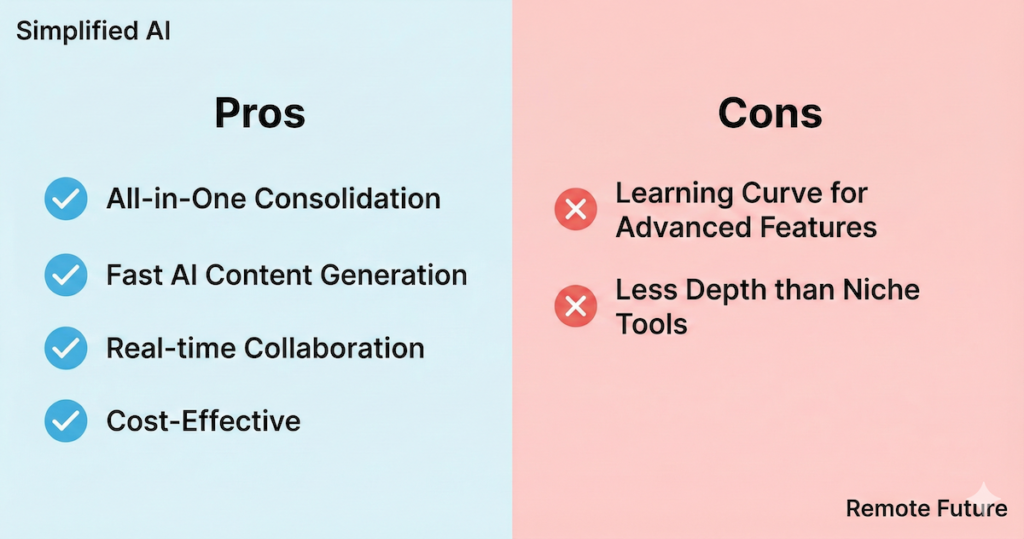
Simplified AI stands out. Primarily, it consolidates various tools into one platform. This integration empowers remote teams to manage tasks efficiently. Specifically, you can handle content creation, social media scheduling, and project management. Best of all, you do this without switching applications. Furthermore, the AI assistance is particularly beneficial. It helps generate ideas, optimize posts, and analyze metrics. Consequently, this saves time. It also reduces cognitive load. Thus, allowing workers to focus on strategic tasks.
Another significant advantage is collaboration. Simplified AI offers robust collaborative features. With real time editing, team members work together seamlessly. This happens regardless of physical location.
Ultimately, this fosters a sense of teamwork. It ensures everyone is on the same page. Indeed, this is crucial for remote operations.
Potential Areas for Improvement
Simplified AI has many strengths. However, there are areas for improvement. For instance, some users report a learning curve. This is especially true for advanced features. Although the platform is user friendly, mastering it takes time. Therefore, you may need to invest effort to unlock its full potential.
Additionally, certain specific features could benefit from refinement. Ultimately, this would enhance the overall user experience.
Customer Support and Community Resources
Customer support is critical for remote users. They may encounter issues while using the platform. Simplified AI offers various options. Specifically, these include a help center and community forums. However, some users desire quicker response times. Additionally, they want more comprehensive resources.
So, a robust support system significantly impacts satisfaction. Indeed, this is especially true if you rely on the tool daily.
Comparison with Specialized Tools
When evaluating Simplified AI, consider the competition. Specifically, compare it to specialized, single purpose tools. Simplified AI provides a broad range of functionalities. However, dedicated tools often offer deeper features. For instance, a specialized social media tool might provide advanced analytics. Alternatively, it may offer better scheduling options. Nevertheless, convenience matters for remote workers. So, having multiple features in one platform is a huge plus. Ultimately, this convenience often outweighs the benefits of using several specialized tools.
For example, if your focus is specifically on logos, vector design, or print-on-demand brand assets, our Kittl AI review covers a purpose-built alternative that goes much deeper on those specific capabilities.
Similarly, if your priority is social media content generation with built-in UGC video ads and automated scheduling, our Predis AI review covers a more focused alternative worth comparing against Simplified AI.
To conclude, Simplified AI presents a compelling option. It is ideal for remote workers seeking versatility. Furthermore, by weighing the pros and cons, you can make an informed decision. You can decide if it aligns with your specific workflow. Remote work continues to evolve. Therefore, tools like Simplified AI play a crucial role. Ultimately, they help professionals adapt and thrive.
Simplified AI Alternatives: Exploring Other AI Tools for Your Remote Workflow
Remote work is evolving. Consequently, professionals are turning to AI tools. They aim to enhance productivity and creativity. Simplified AI is popular for its all in one capabilities. However, exploring alternatives is essential. You may find a tool that better suits your specific needs. In this section, we will identify prominent platforms. Specifically, we will cover content creation, social media, and design. Next, we will compare their features with Simplified AI.
Furthermore, we will analyze pricing. Finally, we will provide guidance on when to choose one tool over another.
Identifying Other Prominent AI Tools
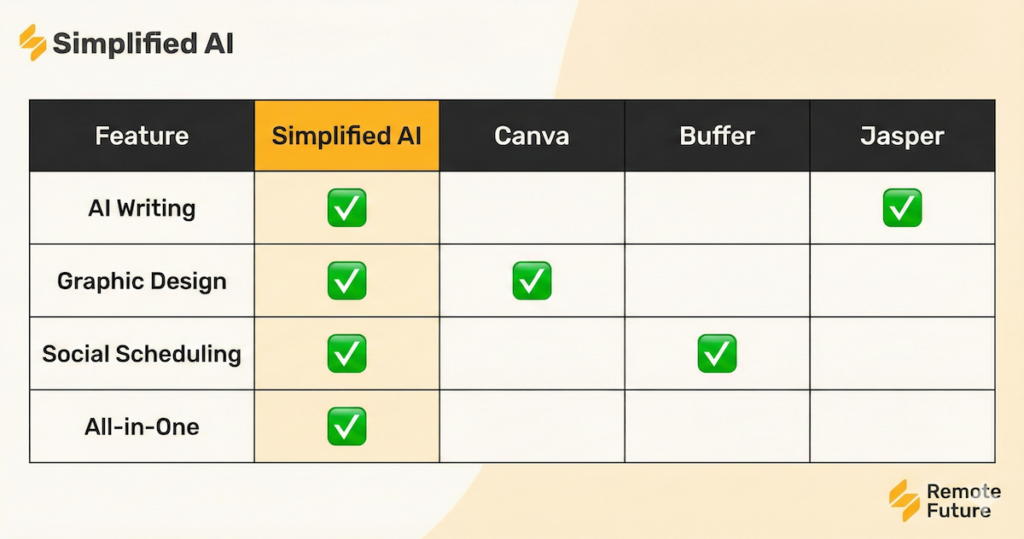
Several AI tools are strong contenders. Each offers unique features for remote work. For example, platforms like Canva, Buffer, and Jasper are noteworthy alternatives. First, Canva excels in graphic design. It provides a user friendly interface for visuals. Next, Buffer focuses on social media management. It allows you to schedule posts and analyze engagement.
Finally, Jasper specializes in AI content creation. Therefore, it is a favorite among writers and marketers.
Feature-by-Feature Comparison
When comparing Simplified AI, look at core offerings. Simplified AI provides a comprehensive suite. Specifically, it includes content creation, social scheduling, and design tools. In contrast, Canva is primarily a design tool. However, it offers great collaboration features for teams. Meanwhile, Buffer stands out for its robust analytics. Thus, it is ideal for social media managers. Finally, Jasper’s strength lies in advanced AI writing. It generates high quality content quickly.
Regarding user experience, Simplified AI prioritizes ease of use. You can navigate features without a steep learning curve. Similarly, Canva is very user friendly. However, Buffer and Jasper are different. They may require more time to master. This is due to their specialized functionalities.
Pricing and Overall Value
Pricing is a significant factor. Simplified AI offers a tiered model. It caters to everyone from freelancers to larger teams. In comparison, Canva provides a free version. However, its Pro plan offers advanced features at a competitive price. Buffer operates differently. Its plans vary based on the number of accounts you manage. Finally, Jasper prices by word count. So, this can be advantageous. Yet, it may become costly for heavy users.
When evaluating value, consider your workflow. Ask yourself what features matter most. If design is your priority, Canva offers better value. Alternatively, for social media, consider Buffer. Its analytics are superior. However, if writing is your main task, choose Jasper. Its AI capabilities often justify the cost.
When to Choose Simplified AI vs. Competitors
Choosing the right tool depends on your needs. Also, consider your budget and workflow. If you require an all-in-one solution, Simplified AI is a strong choice. It combines content, design, and social media. However, if your focus is graphic design, Canva serves you better. Alternatively, look at Buffer for social media. Its scheduling and analytics are superior.
Lastly, if your work revolves around writing, consider Jasper. Its advanced AI capabilities might be the best fit.
Who Benefits Most from Simplified AI? Tailoring to Remote Professionals
Remote work is gaining traction. Consequently, professionals seek tools for their unique needs. Simplified AI stands out as a versatile platform. Specifically, it supports freelancers, solo entrepreneurs, and distributed teams. In this section, we explore how Simplified AI tailors its features. It meets the demands of remote professionals.
Ultimately, this ensures they thrive in their respective fields.
Supporting Freelance Content Creators and Marketers
Freelance creators often juggle multiple clients. Usually, these clients have diverse demands. Fortunately, Simplified AI provides a robust suite of tools. These help professionals manage projects efficiently. Specifically, features include AI content generation, social scheduling, and design. Consequently, freelancers can produce high quality work without extensive resources. For instance, a marketer can create posts tailored to different brands. This ensures each client receives personalized content.
Eventually, it resonates with their specific audience.
Assisting Solo Entrepreneurs and Small Business Owners
For solo entrepreneurs, managing marketing is daunting. This is especially true without a large team. Fortunately, Simplified AI offers an all in one solution. It streamlines various processes. You can create materials, schedule posts, and analyze metrics. Best of all, you do this from one place. Consequently, you can focus on growth. You avoid getting bogged down by administrative tasks.
For example, a business owner can design graphics. Then, they can schedule them across platforms. This saves time. Moreover, it ensures consistent messaging.
Collaboration Features for Distributed Remote Teams
Distributed remote teams often face challenges. Specifically, they struggle with brand consistency and communication. Fortunately, Simplified AI addresses these issues. It offers robust collaboration features. Teams can work together in real time. Consequently, everyone stays aligned with the brand’s vision. For instance, an agency can create a shared workspace. Here, members collaborate on content and review designs. Moreover, they provide feedback instantly. This maintains a cohesive brand identity.
In the end, this collaboration fosters creativity. Indeed, it ensures the final output satisfies everyone.
Use Cases for Different Remote Roles
Different remote roles leverage Simplified AI in various ways. First, consider freelance graphic designers. They utilize the platform to create eye catching visuals for clients. Meanwhile, content writers can generate blog posts quickly. They also produce social media content with ease. Additionally, marketing agencies benefit from the analytics features. They track campaign performance to make data-driven decisions.
By tailoring features to these roles, Simplified AI empowers professionals. Ultimately, this helps them maximize productivity and deliver exceptional results.

Making Your Decision: Is Simplified AI Right for Your Remote Workflow?
Remote work is evolving. Consequently, professionals seek tools to simplify processes. They want to enhance productivity. Simplified AI has emerged as a strong contender. Specifically, it offers features for various remote workflows. In this section, we explore key insights from our review.
As a result, we help you determine if this tool aligns with your needs.
A Concise Recap of Key Findings
Our review reveals a versatile platform. Simplified AI caters to various remote work requirements. Specifically, it offers AI content creation, social scheduling, and collaborative management. Thus, it stands as an all in one tool for freelancers and teams. Furthermore, the user interface is intuitive. It is accessible to everyone, regardless of technical skill.
Finally, the pricing structure is competitive. It offers diverse tiers to fit your budget.
Clear Recommendations for Different Profiles
Is Simplified AI right for you? First, evaluate your professional profile. For freelancers, the AI writing assistant is a game changer. It significantly reduces drafting time. Next, entrepreneurs benefit from social media scheduling. This feature keeps your online presence active. Meanwhile, remote teams will love the collaboration tools. The project management capabilities are excellent.
Therefore, tailor your choice to your needs. This ensures you get the most out of the platform.
Important Considerations Before Committing
Before subscribing, explore the free version. It is a wise move. This allows you to assess the platform’s features. You can see if they align with your requirements. Specifically, take time to experiment. Test the AI tools and social media scheduling. Additionally, consider your workflow. Check if the tool integrates with your current apps.
As a matter of fact, understanding these aspects is key. It helps you make an informed decision.
A Forward-Looking Perspective
The landscape of AI tools is evolving. Fortunately, Simplified AI is well positioned to adapt. Demand for efficient solutions is increasing. Specifically, users need better content creation and project management. Therefore, tools like Simplified AI will shape the future of remote work. The platform stays attuned to user feedback. Also, it monitors industry trends.
Consequently, it can continuously refine its offerings. This adaptability is essential for your long-term workflow.

If you regularly publish AI-assisted content using Simplified, you may want to add a humanizing step before hitting publish. Our Undetectable AI review breaks down whether it is worth it as a finishing tool for your workflow.
Simplified AI FAQ
Q: What is Simplified?
A: Simplified is an all in one creative platform that helps teams create, edit, and publish branded visuals, social posts, and marketing assets faster using AI-powered tools and built-in brand controls.
Q: Can I create presentations and videos in Simplified?
A: Yes. Simplified includes dedicated AI Presentation and AI Video Generation tools to build professional slides and videos quickly — I can guide you to those tools or help plan the content first.
Q: How do I keep my brand consistent?
A: Use a brand kit: upload logos, colors, fonts, and tone of voice rules once, then apply them across all designs and templates for consistent results.
Q: Can I generate custom images and graphics?
A: Absolutely — you can create custom, brand-aligned visuals with AI image generation and image-editing tools tailored to your brief.
Q: Can I schedule and publish social posts from Simplified?
A: Yes — Simplified supports scheduling and publishing to connected social accounts so you can plan and automate your content calendar.
Q: How do I manage my team and assets?
A: Workspaces let you organize team members, set permissions, and centralize assets (images, videos, templates) so everyone shares the same resources.
Q: Is my data and content secure?
A: Your workspace stores assets and projects within your account and access is managed via team permissions. For full security and privacy details, check your account settings or help center.
Conclusion
Are you ready to simplify your creative workflow? Simplified puts everything in one place. Specifically, you get powerful AI tools, brand assets, and publishing features. Consequently, you can create high impact content faster. This consistency matters. Whether you are a solo creator or part of a team, Simplified helps you get more done in less time.
Get started FREE. Create your brand kit and publish your first post in minutes.
Work Smarter. Live Better.
Affiliate Disclosure: This article contains affiliate links. So, if you purchase through my link, I may earn a small commission at no extra cost to you

Ibra A. is the founder of Remote Future, a site covering AI tools, remote work, and online business strategies. He holds a Facebook Social Media Marketing certificate from Coursera and actively tests AI tools to support independent creators and small business owners. His focus is practical, no-hype guidance for people building lean online businesses.
Our content is created using AI tools to support efficient research and writing, with human direction, verification, and editorial review by Ibra A.
AI-assisted content with human editorial oversight.
See our AI editorial policy
Content on Remote Future is created using AI tools to support efficient research and writing for remote workers and creators, followed by human edits for clarity and accuracy.
Read our AI Editorial Policy.