
Last Updated on April 21, 2026
AI Transparency VerifiedCreating high-quality video content is hard. First, you have to buy expensive equipment. Then, you need to find the perfect lighting. Finally, you have to overcome the fear of staring into a camera lens. Indeed, It is exhausting. But what if you could create professional videos without recording a single frame? Introducing Synthesys AI.
Synthesys AI claims to be a complete content suite, allowing you to generate AI videos, voiceovers, and images in minutes. So, for remote workers, digital marketers, and educators, this sounds like a dream come true.
However, is it actually as good as it sounds?
So, in this comprehensive guide, I will explore everything Synthesys AI has to offer. I will break down its features, pricing, and potential limitations. Although I have not personally tested the tool yet, this review is based on official documentation, platform demos, feature comparisons, and real-world use cases shared by users.
What is Synthesys AI?
Synthesys AI is a cloud-based platform designed to democratize content creation. Essentially, it uses artificial intelligence to turn text into multimedia.
Most people know it for its AI Avatars (or “Humatars”). These are digital actors that speak your script with realistic lip-syncing. Therefore, instead of hiring an actor or filming yourself, you simply type what you want them to say.
As a matter of fact, Synthesys is not just a video tool.
It has evolved into a “Swiss Army Knife” for content creators. The platform now includes text to speech generators, AI image creation. And, even voice cloning technology.
You can read our full Heygen Review here: HeyGen AI Review 2026: Surprisingly Simple and Worth It
Why Is Everyone Talking About AI Video?
The demand for video is exploding. Social media algorithms love it, and customers prefer watching to reading.
- Speed: You can create a video in minutes, not days.
- Cost: You avoid studio fees and actor salaries.
- Scale: You can update a script and re-render the video instantly.
Synthesys AI aims to be the leader in this space by focusing on realism. So, while some tools look like cartoons, Synthesys pushes for a more life-like aesthetic.
Deep Dive: The Core Features Of Synthesys AI
Furthermore, to understand if this tool is right for you, we need to look closely at what it actually does. In fact, the platform is divided into several key products.
1. Synthesys AI Video Generator (Humatars)
This is the flagship feature. The concept is simple: you choose an avatar, choose a voice, and type your script.
Synthesys offers a growing library of professional stock avatars. The exact number and availability depend on your subscription plan and region. These cover various ages, ethnicities, and professional styles. Whether you need a casual spokesperson for a TikTok ad or a professional presenter for a corporate training video, you will likely find a match.
How It Works:
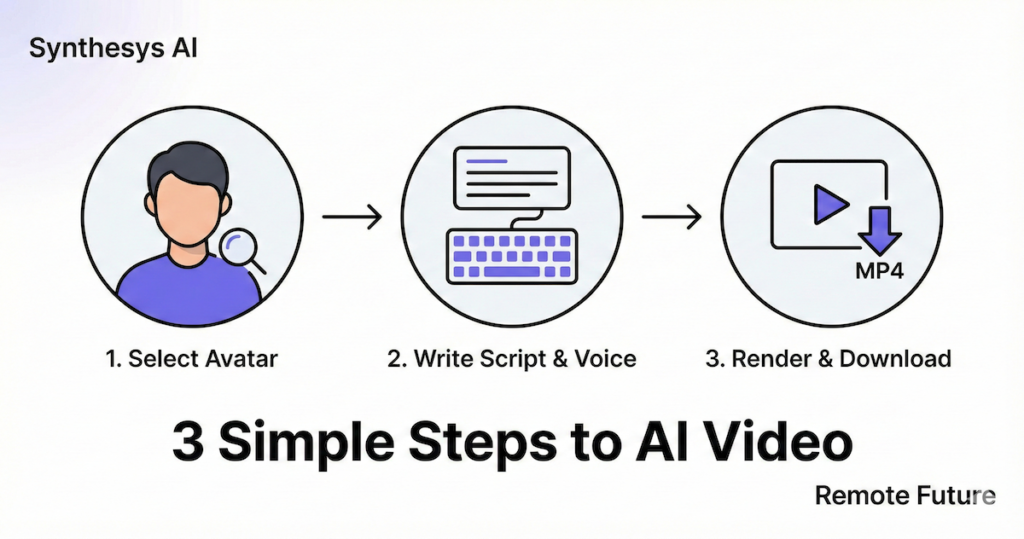
- Select an Avatar: Browse the library and pick a face.
- Input Text: Type out your script.
- Choose a Voice: Pair the avatar with a matching voice.
- Render: The AI animates the face to match the words.
Realism and Quality: The biggest challenge for AI video is the “uncanny valley”. Where a face looks almost human but slightly “off.” Synthesys claims to use advanced algorithms to ensure natural facial movements. They focus heavily on lip-syncing, aiming for close alignment between audio and mouth movement.
2. Synthesys AI Voice Generator (Text-to-Speech)
Before AI video, Synthesys was known for its audio.
Their text-to-speech engine is massive. It offers a very large library of AI voices across many languages, with voice quality and availability varying by language. This is a huge advantage for global businesses.
Beyond “Robotic” Voices: We have all heard bad text-to-speech. It sounds flat and monotonous. Synthesys attempts to improve realism through different voice styles and pacing controls.
- Tone Control: You can often adjust the pitch and speed.
- Styles: Some voices are designed for news reading, while others are conversational.
- Pauses: You can add pauses to make the speech sound more natural.
Therefore, for a remote team, this means you can create training materials in English, Spanish, and Japanese without hiring three different voice actors.
3. Synthesys AI Voice Cloning
This is a feature that feels like science fiction.
Voice cloning is available on select higher-tier plans and allows you to upload a sample of your own voice. The AI analyzes it and creates a digital replica. Once the clone is ready, you can type any text, and the AI will read it out in your voice.
Why use this?
- Consistency: If you are a brand founder, you can narrate hundreds of videos without actually recording them.
- Updates: If you need to change one sentence in a video next year, you just type the new line. So, you do not need to set up your microphone again.
4. Synthesys AI Image Generator
Without doubt, visuals are just as important as audio.
Synthesys includes an AI image generator within the suite. This works through text prompts, but is more limited than advanced tools like Midjourney or DALL-E. You describe an image (“A futuristic office with plants”), and the AI creates it.
As a result, having this integrated means you do not need to switch tabs. You can generate a background image for your video directly inside the platform.
5. Synthesys AI FaceSwap Technology
Face replacement features are restricted, subject to ethical guidelines, and availability depends on plan and use case.
This is a fun and powerful addition.
Therefore, faceSwap allows you to change the face of a person in a video or image.
- Personalization: You could take a stock video of a doctor and swap in your own face (if you are a doctor).
- Marketing: You can test different demographics in your ads without re-shooting the footage.
6. Synthesys AI Instant Avatar
Consequently, if you do not want to use a stock avatar, you can create your own.
Instant Avatar lets you upload a short video of yourself. The AI captures your appearance and basic speaking style based on a recorded video. Then, you can use this digital twin to generate future videos. This is fantastic for personal branding. It builds trust because your audience sees you, even if you did not physically record the message that day.
Step-by-Step Tutorial: Creating Your First Video
If you have never used an AI video generator before, the interface can feel overwhelming.
Do not worry.
I have broken down the process into five simple steps. Even if you are not “tech-savvy,” you can follow this guide to create your first professional video in under 15 minutes.
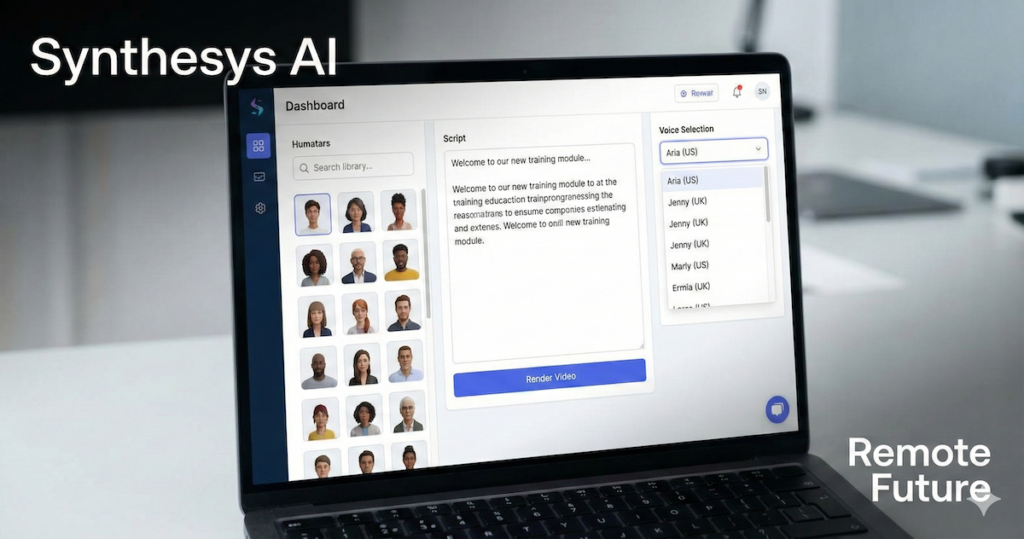
Step 1: Account Setup and Dashboard
First, head to the Synthesys website and log in. If you are on the Free Trial, you will see a limited dashboard.
- Click on “Synthesys Studio“ (sometimes labeled “Human Studio”).
- You will see a canvas that looks a bit like PowerPoint. This is your workspace.
Step 2: Choose Your Avatar
On the left-hand sidebar, you will see the “Avatars” tab.
- Filter by Category: You can sort by age, outfit (casual vs. business), or ethnicity.
- Preview: Hover over an avatar to see a short preview of how they move.
- Select: Click on the avatar you like. They will appear on your canvas. You can drag and drop them to position them on the left, right, or center of the screen.
Pro Tip: If you are making a formal presentation, choose an avatar in a suit. If you are making a social media reel, choose someone in a t-shirt. Context matters!
Step 3: Write Your Script
Below the canvas, you will see a text box. This is where the magic happens.
- Type your text: Enter the script you want the avatar to speak.
- Add Pauses: Most people speak too fast. Use the
<break>tag or the “Add Pause” button to insert silence between sentences. This makes the speech sound much more natural. - Check Character Limit: Keep an eye on your credit usage. Longer scripts consume more credits.
Step 4: Select the Perfect Voice
Next to the script box, click the “Voice” menu.
- Language: Select your target language (e.g., English – US).
- Voice Style: You will see names like “Aria,” “Jenny,” or “Guy.”
- Listen to Samples: Click the play button next to each name.
- Match the Avatar: Try to pick a voice that matches the avatar’s face. A deep, gravelly voice might not fit a young, cheerful avatar.
Step 5: Background and Branding
You do not want a white background.
- Click “Backgrounds”: You can choose a stock image (like an office or living room) or upload your own image.
- Add Text: Use the text tool to add your headline or bullet points on the screen.
- Add Logo: Upload your company logo and place it in the corner for branding.
Step 6: Render and Download
Once you are happy, click the “Create” or “Render” button.
- Wait: Processing time varies depending on length, plan, and server load, but is often close to real-time.
- Notification: You will usually get an email or a notification when the video is ready.
- Download: Go to “My Projects” and download the MP4 file. You can now upload it to YouTube, LinkedIn, or your website!
Comparison: Synthesys AI vs. The Giants
You might be wondering, “How does this compare to Synthesia or HeyGen?”
These are the three biggest names in the industry. While they all do similar things, they have different strengths. I have created this comparison table to help you decide.
| Feature | Synthesys AI | Synthesia | HeyGen |
| Best For | All-in-One Content Creators | Enterprise & Corporate Teams | Viral Social Media Creators |
| Starting Price | Free Plan Available | Basic Free Plan Available | Free Plan Available |
| Avatar Count | 80+ Humatars | 160+ Avatars | 120+ Avatars |
| Voice Options | 300+ Voices (Massive variety) | 130+ Voices | High quality, fewer options |
| Video Editor | Basic (Slide-based) | Advanced (Timeline-based) | Moderate |
| Translation | Excellent (140+ Languages) | Excellent | Best-in-Class (Lip-syncs translation) |
| Unique Feature | Includes AI Image Generator | SOC 2 Security Compliance | URL-to-Video Generation |
| Ease of Use | High | Medium (More professional tools) | High |
Pricing and features vary by plan, region, and promotion and may change over time.
The Verdict on Comparison. Choose:
- Synthesia if you are a large company (like a Fortune 500) that needs strict security and highly polished, corporate-style videos.
- HeyGen if you want the absolute best lip-syncing for social media and need a free tier to start.
- Synthesys if you want an all-in-one platform that combines video, voice, and basic visuals in one subscription. It gives you video, audio, and images in one subscription. It is perfect for the “solopreneur” or small marketing agency that needs to do a little bit of everything.
Who Is Synthesys AI For?
This tool is not for everyone. Hollywood directors will not be using it for their next blockbuster. However, for business use, it is incredibly versatile.
1. Digital Marketers
You need to produce content fast.
- Use Case: Create 10 variations of a Facebook ad to test different scripts.
- Benefit: High volume, low cost.
2. Corporate Trainers & HR
Onboarding new employees is repetitive.
- Use Case: Create a “Welcome to the Company” video series.
- Benefit: If company policy changes, you just update the text and re-render. No need to re-hire the actor.
3. E-Learning Course Creators
Students engage more with video than text.
- Use Case: Turn a PDF textbook into a series of video lectures with a virtual teacher.
- Benefit: Accessibility. You can easily translate the course into different languages for international students.
4. Customer Support Teams
Answering the same questions is tedious.
- Use Case: Create a “Help Center” video library where an avatar explains how to reset a password.
- Benefit: Reduces ticket volume and provides 24/7 visual support.
Industry Deep Dive: Real-World Examples
To give you a better idea of how this actually works in the wild, let us look at two specific industries that are adopting this technology rapidly.
🏠 Industry 1: Real Estate
Real estate agents are busy. They are driving to viewings, negotiating contracts, and managing listings. They often know they should be doing video marketing, but they simply do not have the time to film themselves.
The “Virtual Agent” Strategy Instead of filming a new “Just Listed” video every week, an agent can use Synthesys.
- The Intro: Use a professional-looking avatar (wearing a suit) to introduce the property. “Welcome to 123 Maple Drive, a beautiful 3-bedroom home in the heart of the city.”
- The Slideshow: The video cuts to high-quality photos of the house (kitchen, garden, bedroom) while the AI Voiceover continues describing the features.
- The Outro: The avatar returns to the screen for the call to action. “Call me today for a viewing.”
Why this wins:
- Consistency: Every video looks professional.
- Speed: You can create a listing video at 11 PM in your pajamas.
- Language: If you have international buyers, you can instantly duplicate the video and have the avatar speak in Mandarin or Spanish.
🛒 Industry 2: E-Commerce
Online stores often struggle with high return rates because customers do not fully understand the product.
The “Product Explainer” Strategy Imagine you sell complex camping gear. A text description is boring.
- The Problem: Use an avatar to state the customer’s pain point. “Do you hate it when your tent leaks in the rain?”
- The Solution: The avatar explains the technical features of your product. “Our tent uses a triple-layer waterproof coating…”
- The FAQ: You can create a library of short videos answering common questions. “How do I fold the tent?” “Is it machine washable?”
Why this wins:
- Trust: Seeing a “person” (even a digital one) explain a product builds more trust than text alone.
- SEO: Video keeps people on your product page longer, which sends positive signals to Google.
- Updates: If you change the product specs, you do not need to re-shoot the video. Just edit the script.
For ecommerce and social media ads specifically, Creatify AI takes a different approach — turning product URLs directly into finished video ads.
If you need a more complete faceless video tool that combines UGC ads, AI influencers, niche content generators, and long-form video automation in one platform, our StoryShort AI review covers a strong alternative worth considering alongside Synthesys.
Synthesys AI Pricing Breakdown
Budget is always a major factor. Synthesys offers a tiered pricing structure. It is important to note that they often have “credits” based systems.
Free Plan
- Cost: $0
- Good for: Testing the waters.
- Limitations: Very limited credits. You can likely make one very short video to see how the interface works.
Personal Plan
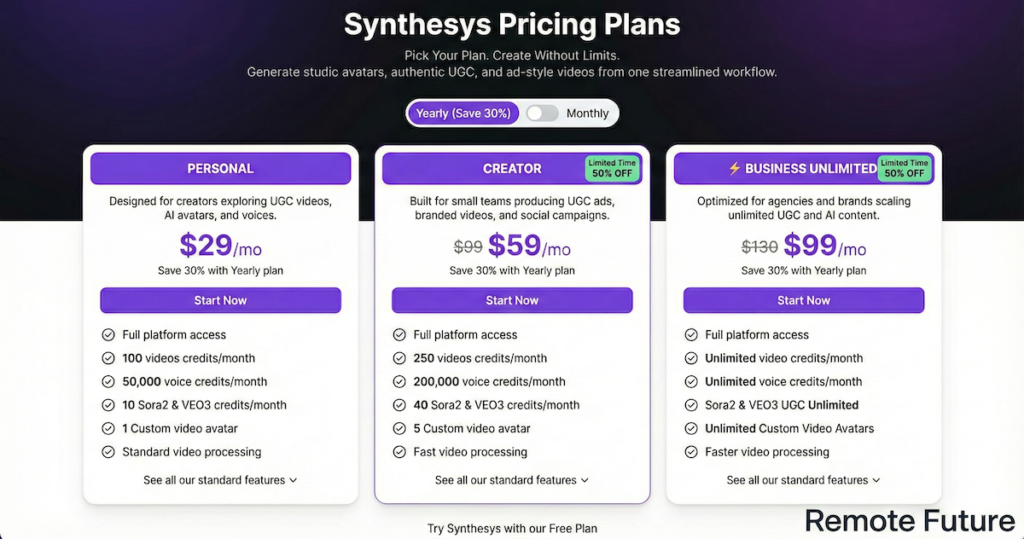
- Cost: Around $29/month ($243/yearly).
- Best for: Solopreneurs or hobbyists.
- Includes:
- 100 video credits per month.
- Basic access to avatars and voices.
- Standard processing speed.
Creator Plan
- Cost: Around $59/month ($495/yearly).
- Best for: Small businesses and active content creators.
- Includes:
- 250 video credits.
- More voice credits.
- Access to premium avatars.
- Faster rendering.
Business Unlimited
- Cost: Around $99/month ($831/yearly).
- Best for: Agencies and heavy users.
- Includes:
- Unlimited video credits (subject to fair use).
- Unlimited voice generation.
- Priority support.
- 4K export resolution.
Note: Pricing is subject to change. Always check the official website for the latest deals.
Is it worth it? If you hire a freelancer on Upwork to edit a single video, it might cost $50-$100. Therefore, if Synthesys allows you to make 10 videos for $41, the potential ROI can be attractive for users who produce video content regularly.
Pros and Cons of Synthesys AI
Every tool has strengths and weaknesses. Here is an honest assessment based on the features.
✅ The Pros
1. Massive Voice Selection Having over 300 voices is a huge benefit. You are not stuck with the same generic “AI voice” that everyone else uses. You can find a voice that truly fits your brand personality.
2. All-in-One Platform It is convenient. You do not need a separate subscription for an image generator or a voice cloner. Having everything in one dashboard saves time and reduces “subscription fatigue.”
3. User-Friendly Interface The tool is built for non-technical users. It uses a “slide-based” editor, similar to PowerPoint. If you can make a slide deck, you can probably make a video on Synthesys.
4. Cloud-Based There is nothing to download. You can use it on a Mac, PC, or even a Chromebook. All the heavy rendering happens on their servers, not your laptop.
❌ The Cons
1. Credit Limits Unless you are on the Unlimited plan, you have to watch your credits. If you make a mistake and have to re-render a video, you burn credits. This can be stressful for new users.
2. Render Time AI video is not instant. It takes time to process. If you are in a rush to post something right now, you might find the wait time frustrating, especially during peak hours.
3. “Uncanny Valley” While the technology is amazing, it is still AI. Occasionally, an avatar might blink weirdly or a hand gesture might look stiff. It is 95% realistic, but that last 5% is still noticeable to a keen eye.
4. Lack of Advanced Editing The built-in video editor is basic. It is great for putting an avatar on a background. However, if you want complex transitions, color grading, or special effects, you will likely need to export the video and finish it in Adobe Premiere or CapCut.
Frequently Asked Questions (FAQs)
1. Can I use Synthesys videos on YouTube?
Yes. You have commercial rights to the videos you create. Many creators use them for faceless channels.
2. Is there a free trial?
Yes, there is a free plan, but it is very limited. It is best used just to test the interface before buying.
3. Can I upload my own voice?
Yes. On supported plans and with voice ownership verification. However, you usually need a higher-tier plan to access this feature fully.
4. Do the avatars speak other languages?
Absolutely. The multilingual support is one of the platform’s strongest features.
5. Is the content unique?
The script is yours, but the avatars are stock. This means other companies might use the same “spokesperson” as you. For a unique look, you should use the Instant Avatar or Custom Avatar features.
Conclusion: Is Synthesys AI Right for You?
We are living in a golden age of content creation. Tools like Synthesys AI are breaking down barriers. They make video production accessible to everyone, regardless of budget or technical skill.
Synthesys is a strong choice if you:
- Need to produce educational or training content at scale.
- Want to reach a global audience with multilingual video.
- Are camera-shy but want the engagement benefits of video.
- Want an all-in-one tool that handles voice, video, and images.
It might not be for you if:
- You need cinematic, emotionally complex storytelling (human actors are still best for this).
- You need advanced video editing capabilities inside the browser.
Ultimately, Synthesys AI delivers on its promise: it makes realistic AI video easy. It removes the friction from the creative process. While it may not perfectly replace a human connection in every scenario, it is a powerful tool for your digital toolkit.
If you are ready to scale your video production, it is certainly worth exploring.
Takeaway: The future of work is efficient, global, and digital. Synthesys AI aligns perfectly with this vision.
Ready to try it out?
Work Smarter. Live Better.
Affiliate Disclosure: This article contains affiliate links. So, if you purchase through my link, I may earn a small commission at no extra cost to you.
You Might Also Like These AI Tools:
Predis.ai Review: The Smart Social Media Assistant
Makereels AI Review 2025: The Ultimate Guide to Viral Reels

Ibra A. is the founder of Remote Future, a site covering AI tools, remote work, and online business strategies. He holds a Facebook Social Media Marketing certificate from Coursera and actively tests AI tools to support independent creators and small business owners. His focus is practical, no-hype guidance for people building lean online businesses.
Our content is created using AI tools to support efficient research and writing, with human direction, verification, and editorial review by Ibra A.
AI-assisted content with human editorial oversight.
See our AI editorial policy
Content on Remote Future is created using AI tools to support efficient research and writing for remote workers and creators, followed by human edits for clarity and accuracy.
Read our AI Editorial Policy.