

Published on January 31, 2026
AI Transparency VerifiedHave you ever had a million-dollar app idea while standing in the shower, only to realize you do not know how to code? You are not alone — and that is exactly why Bubble has become one of the most popular no-code website and app builders in the world.
For years, a lack of coding skills stopped entrepreneurs in their tracks. Today, the no-code movement is changing everything. It promises that anyone can build real software, and Bubble sits right at the top of that revolution.
You might have heard the hype. People say you can build clones of Facebook, Airbnb, or Uber. But is Bubble really the best no-code builder in 2026?
In this honest Bubble review, I will break everything down — what it is, how it works, its real limitations, pricing, and whether it is the right tool for your business.
What Exactly Is Bubble?
Before we decide if it is the “best,” we need to understand what it is.
Imagine you want to build a house.
- Traditional Coding is like chopping down trees, sawing the wood, and forging your own nails. It is slow, hard, and requires years of training.
- Bubble is like having a truckload of pre-made walls, windows, and doors delivered to your lot. You still have to design the house and bolt it together, but the heavy lifting is done for you.
It is Not Just a Website Builder
This is the most common confusion for beginners. You might be thinking, “Is this like Wix or Squarespace?”
The answer is no.
Wix and Squarespace are Website Builders. They are great for static pages. A portfolio, a restaurant menu, or a blog is a website. It sits there and looks pretty.
Bubble is a Web & Mobile App Builder. An application “does” things. It:
- Has a brain.
- Remembers who you are when you log in.
- Saves your favorite items.
- Processes payments.
- Calculates data.
If you want to build a brochure, use Wix. If you want to build a business, a tool, or a marketplace, use Bubble.
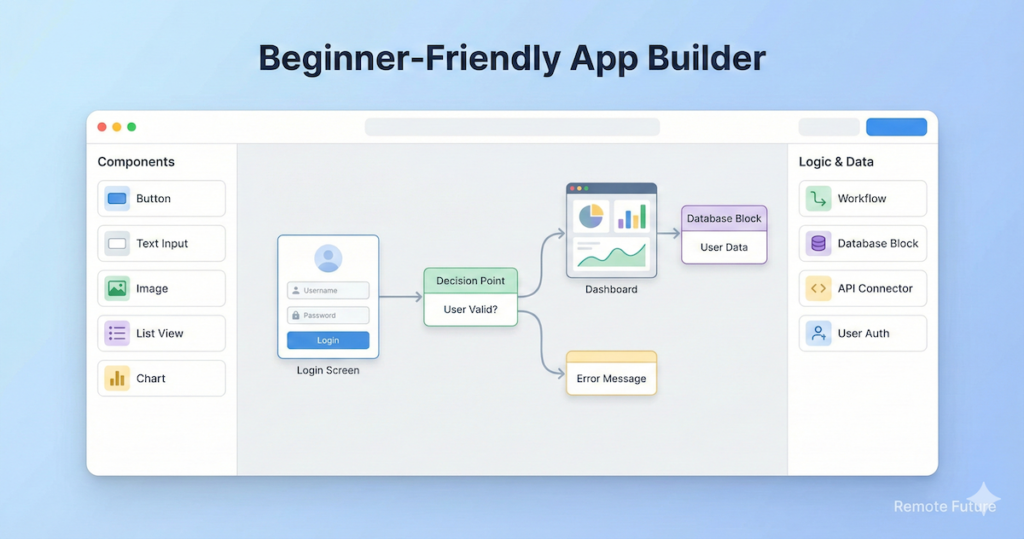
How Does Bubble Actually Work?
If you sign up for a free account and open the editor, it might look a little scary. It looks a bit like Photoshop mixed with Excel.
But do not panic. The whole platform relies on just three main pillars. If you understand these three things, you understand Bubble.
1. The Visual Design (The Face)
This is the drag-and-drop part. On the left side of your screen, you have a list of elements: Buttons, Text, Images, Icons, Maps, and Inputs.
You simply click an element and drag it onto your empty page. You can resize it, change the color to match your brand, and move it anywhere you want.
Why this is cool: Most website builders force you to use “blocks” or templates. You cannot move a button two inches to the left because the template will not let you. Bubble allows for pixel-perfect design. If you want a button to be exactly 50 pixels from the top, you can put it there. You have total freedom.
2. The Workflow (The Logic)
This is where the magic happens. This is where you turn a static picture into a working app.
In traditional coding, you would write a script to make a button work. In Bubble, you use sentences.
It looks like this. You:
- Click on your button.
- Click “Start/Edit Workflow.”
- Select an action from a menu.
You essentially tell Bubble: “When the user clicks this button, send an email to the user, and then navigate to the ‘Thank You’ page.”
You chain these actions together like a recipe. Therefore, you do not need to memorize syntax; you just need to think logically about what you want to happen step-by-step.
3. The Database (The Memory)
Every app needs a memory.
- Facebook needs to remember your friends.
- Amazon needs to remember your past orders.
- Airbnb needs to remember which dates a house is booked.
Bubble comes with a built-in database. You do not need to set up a server or buy hosting from Amazon Web Services (AWS). It is already there.
You simply create “Types” of data.
- Type: User (Name, Email, Photo)
- Type: Product (Price, Description, Image)
Then, you connect them. It sounds complex, but Bubble makes it visual. It feels more like organizing a spreadsheet than managing a server.
What Can You Actually Build?
This is usually where beginners get excited. The short answer is: almost anything.
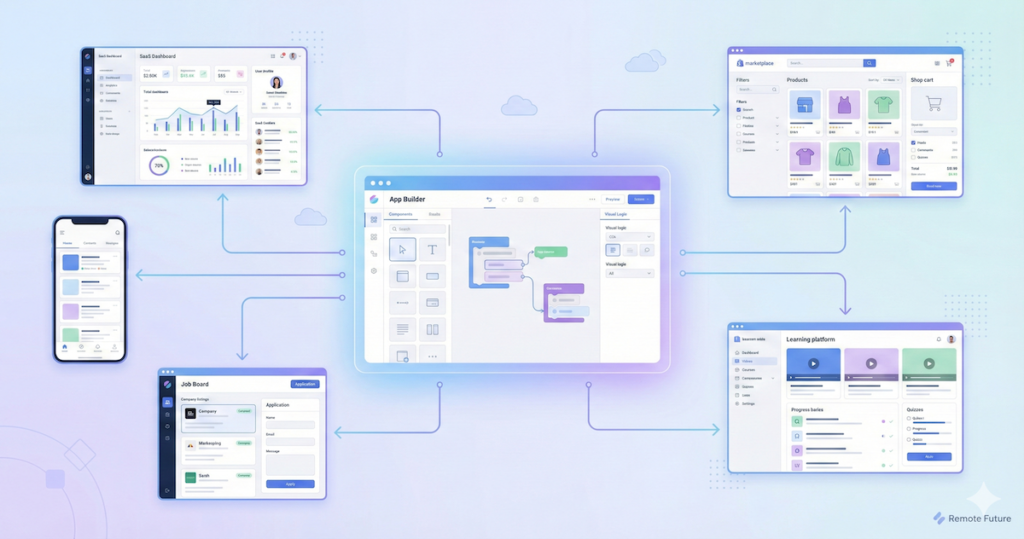
Here are five real-world examples of things you can build on Bubble:
- A Real Estate Marketplace: Users can create accounts, upload photos of their houses, set a price, and other users can search by location and book a viewing.
- A Job Board: Companies pay a fee to post a job. Applicants upload resumes. You build a dashboard where companies can approve or reject applicants.
- A Learning Platform: You upload video courses. Students pay a monthly subscription to watch them. The app tracks their progress and issues a certificate when they finish.
- A Project Management Tool: Like Trello or Asana. Teams can create tasks, assign them to members, and drag them between “To Do” and “Done” columns.
- AI Tools: This is very popular right now. You can connect Bubble to OpenAI (ChatGPT) to build tools that write blog posts, generate images, or summarize text for your users.
What can you NOT build? Bubble is not great for everything.
- High-end Video Games: If you want to build the next Mario Kart, this is the wrong tool.
- High-Frequency Trading: If you need to process nanosecond stock trades, you need custom code.
Real Success Stories (Proof It Works)
You might be thinking, “Sure, I can build a toy app, but can I build a real business?”
This is where Bubble shines compared to other tools. It is not just for prototypes. Real entrepreneurs are building multi-million dollar companies on this platform. Here are three famous examples to inspire you:
- Comet: A marketplace connecting freelance tech workers with companies. They scaled their platform to generate over $800k in monthly revenue, and the core was built on Bubble.
- Dividend Finance: A massive fintech company in the solar energy space. They used Bubble to process over $1 billion in loans. This proves Bubble is secure enough for sensitive financial data.
- Plato: A mentorship platform for engineers. They used Bubble to get into Y Combinator (the most famous startup accelerator in the world).
The Lesson: Do not let “imposter syndrome” stop you. These founders did not have code. They had an idea, and they used Bubble to prove it worked.
The Reality Check (The Learning Curve)
I promised you an honest review, so we need to talk about the difficulty.
Many no-code influencers will tell you that you can “Build an app in 10 minutes!” This is a lie.
Bubble is a professional tool. It is like learning to play the piano. You can make noise in 5 minutes, but you cannot play a symphony until you practice.
The “Cliff”
When you start, you will feel amazing. You will drag a button onto the screen and feel like a wizard. Then, you will try to do something complex, like “Filter this list of users by location and sort by age,” and you will get stuck.
We call this The Bubble Cliff.
Most people quit here. They get frustrated because they thought it would be effortless.
- Expectation: “I will build my startup this weekend.”
- Reality: It will probably take you 2 to 4 weeks of studying to feel comfortable.
My advice: Do not rush. Treat it like a class. Watch the official Bubble tutorials. If you accept that you need to learn, you will succeed.
Mobile Apps and SEO
These are the two biggest worries for new Bubble users. Let us clear them up, especially with Bubble’s recent updates.
Can Bubble build mobile apps?
Yes. In fact, this is now a core part of the platform.
For a long time, Bubble was just for web apps (websites that act like apps). But recently, they launched a Native Mobile Editor.
- What this means: You can now build an app specifically for iOS and Android directly inside Bubble.
- The Features: As you can see in their new pricing, even the Free plan now includes the “Native mobile editor” and “On-device testing.”
This is a game-changer. You do not need third-party tools anymore. You can build your web dashboard and your mobile app all in one place.
Is Bubble good for SEO (Google Ranking)?
In the past, people said Bubble was bad for SEO. Today, that is mostly a myth.
Bubble lets you control your Meta Titles, Meta Descriptions, and URL structures. There are plenty of Bubble apps that rank on page 1 of Google.
- However: If your only goal is to write a blog (like this one), WordPress is still better for SEO.
- If your goal is to build a tool that also ranks on Google, Bubble is perfectly fine.
The Secret Power (APIs and Integrations)
If you really want to understand why Bubble is a “superpower,” you need to understand one slightly technical term: API.
Do not worry, I will keep it simple. An API is like a waiter in a restaurant. It takes a message from your app, delivers it to another app, and brings the answer back.
Bubble is famous for its “API Connector.” This allows your Bubble app to talk to almost any other service on the internet.
- Want to take payments? Connect Bubble to Stripe.
- Want to send text messages? Connect Bubble to Twilio.
- Want AI? Connect Bubble to OpenAI (ChatGPT).
Why this matters for beginners: You are not limited by what Bubble can do. You are limited by what the internet can do.
Pricing – How Much Does It Really Cost?
Bubble recently updated their pricing structure. It is important to understand what you are paying for because it is not just about a flat fee anymore. In fact, it is also about “Workload.”
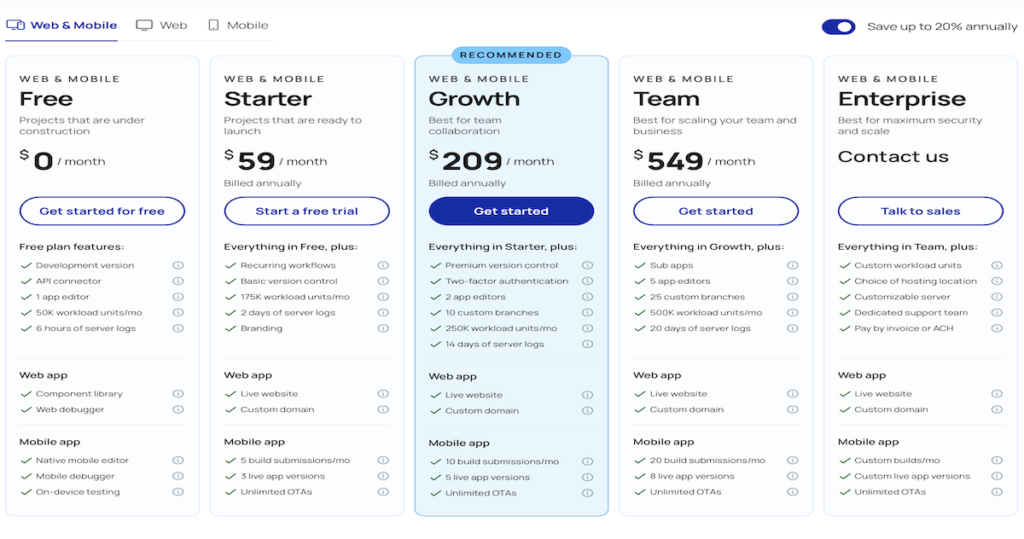
Here is the breakdown of the current plans (billed annually):
1. The Free Plan ($0/month)
This is incredibly generous. It is designed for “Projects that are under construction.”
- What you get: You can access the full App Editor, the API connector, and the Component Library.
- New Feature: You also get access to the Native Mobile Editor to start building your iOS/Android app.
- The Catch: You cannot launch on a custom domain (like www.yourname.com). Your app will sit on a bubbleapps.io address.
2. The Starter Plan ($59/month)
This is for “Projects that are ready to launch.”
- Who is this for? Solopreneurs and early-stage startups.
- Key Features: You get a live custom domain, basic version control (so you do not break your app), and recurring workflows.
- Mobile: You can submit your mobile app to the app stores (5 builds/month).
- Workload: You get 175k Workload Units.
3. The Growth Plan ($209/month)
This is labeled “Recommended” and is best for “Team collaboration.”
- Who is this for? Growing businesses with active users.
- Key Features: Two-factor authentication for security, 10 custom branches for development, and 2 app editors (so two people can work at once).
- Workload: Increased to 250k Workload Units.
4. The Team Plan ($549/month)
This is for scaling businesses. You get 500k Workload Units, sub-apps, and 5 app editors.
What are “Workload Units”?
You will notice the pricing mentions “Workload Units” (e.g., 50k, 175k). Think of this like gas for your car. Every time your app does something—like creating a user, sending an email, or searching the database—it uses a tiny bit of “gas.”
- Simple apps use very little fuel.
- Complex apps with thousands of users use more fuel.
- Good News: The Starter plan (175k units) is plenty of fuel for almost any new launch. You generally only need to worry about upgrading when you are already making money.
💡 Quick recommendation:
For beginners and solo founders, the Starter plan ($59/month) is more than enough to launch a real product. Most users only need to upgrade once they already have paying customers.
Bubble vs. The Competition
Bubble is not the only player in town. Recently, a new wave of “AI Builders” has appeared. How does Bubble stack up against them?
Bubble vs. HeyBoss AI (The New Challenger)
HeyBoss AI is a “text-to-app” platform. Instead of dragging and dropping buttons yourself, you chat with an AI agent (like a digital project manager), and it builds the site for you in about 15 minutes.
👉 If you want a deeper look, we have published a full HeyBoss AI review explaining how it works, pricing, and best use cases.
- Choose HeyBoss if: You want speed above everything else. You need a standard business website or simple app right now, and you do not want to learn how to use a design tool. It handles the SEO, marketing, and design automatically.
- Choose Bubble if: You need control. If you are building a unique startup (like a new type of social network), AI generators often hit a wall. Bubble lets you build exact, custom features that no AI can guess perfectly yet.
Bubble vs. Webflow
Webflow is an incredible design tool. It creates the most beautiful websites on the internet.
- Choose Webflow if: You are building a marketing site, a portfolio, or a standard blog. It is for displaying content.
- Choose Bubble if: You need users to log in and interact with data. Webflow is weak on “logic,” while Bubble is the king of logic.
Bubble vs. Glide
Glide lets you turn a Google Sheet into an app in 5 minutes.
- Choose Glide if: You need a simple internal tool for your employees, like an inventory tracker. It is very easy but limited in design.
- Choose Bubble if: You want a customer-facing product that looks exactly how you want it to look.
Bubble vs. FlutterFlow
FlutterFlow is a powerful competitor for mobile apps.
- Choose FlutterFlow if: You only care about a mobile app and do not care about the web browser.
- Choose Bubble if: You want an all-in-one solution. With Bubble’s new native mobile features, the gap between these two is closing fast.
Three Common Mistakes Beginners Make
I want you to succeed, so I am going to share the three traps almost every new Bubble user falls into.
Trap #1: The “Kitchen Sink” Syndrome. When you realize you can build anything, you try to build everything. You start building a marketplace, then decide to add a social network, then a blog.
- The Fix: Build an MVP (Minimum Viable Product). Pick the one core feature your app needs to work, and build only that.
Trap #2: Ignoring “Responsive Design” Until the End. Beginners often design their app to look perfect on their laptop screen. Then, they open it on their phone, and it looks broken.
- The Fix: Use Bubble’s “Responsive” tab from Day 1. Every time you add a button, check how it looks on mobile.
Trap #3: Over-Complicating the Database. It is tempting to create a million different data types.
- The Fix: Keep it simple. Use pen and paper first. Draw out your data. Simple databases run faster and are easier to manage.
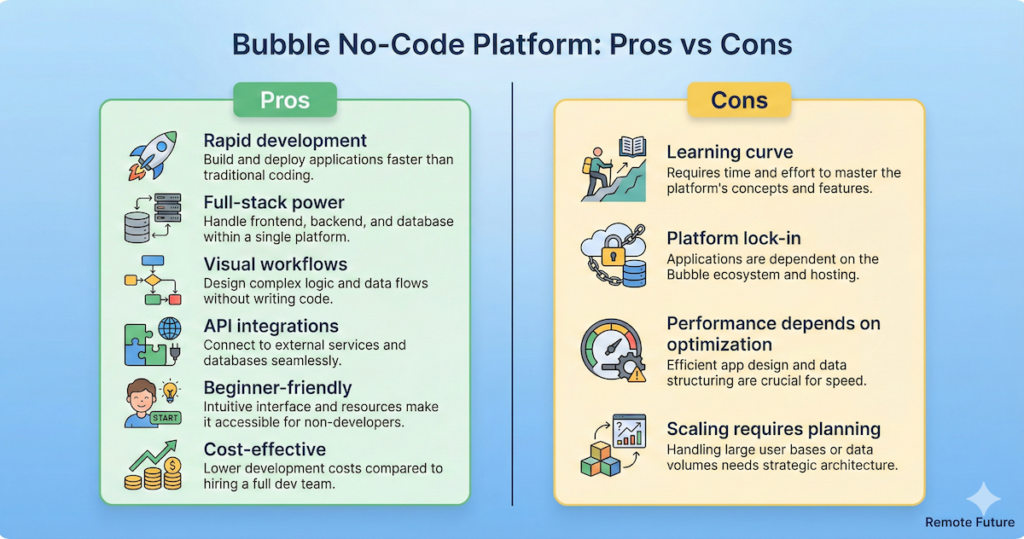
Pros and Cons Summary
To make this easy for you, here is a quick summary of the good and the bad.
The Pros (Why we love it)
- Full Stack Power: You get the design, the logic, and the database all in one place.
- New Mobile Features: The native mobile editor (even on the Free plan) is a massive win for 2026.
- Community: The Bubble user forum is huge. If you get stuck, someone has probably already asked your question and solved it.
- Cost-Effective: Starting at $59/month is much cheaper than hiring a developer.
The Cons (What to watch out for)
- Platform Lock-in: You cannot “export” your code. You are renting the technology, not owning it.
- Complexity: As mentioned, it takes time to learn.
- Pricing Complexity: You need to keep an eye on your “Workload Units” as you scale.
How to Start (A Step-by-Step Guide)
If you are ready to give it a try, here is your roadmap for the next 7 days.
Day 1: The Setup Go to Bubble’s website and create a free account. Do not worry about the pricing page. Just get in. Click “New App” and choose “Start from Blank.”
Day 2: The Tutorials Bubble has a series of “Interactive Lessons” inside the editor. Do all of them. They will teach you how to save data and how to sign users up.
Day 3: The Clone Do not try to build your dream idea yet. Instead, try to build a simple “To-Do List” app.
- Create an input box to type a task.
- Create a button to save it.
- This teaches you the fundamentals of the database.
Day 4: The Design. Play with the “Responsive Engine.” Try to make your To-Do list look good on your mobile phone screen and your laptop screen.
Day 5: The Logic. Add a feature to “delete” a task when it is done. Add a feature to “edit” a task. This teaches you how to manipulate data.
Day 6 & 7: The Dream. Now that you have built a throwaway app, you are ready to start sketching your actual business idea.
Frequently Asked Questions (FAQ)
Q: Is Bubble really free? Yes, the Free plan is excellent. It lets you use the full editor, including the new Native Mobile editor, and gives you 50k Workload Units. You only pay when you are ready to launch on a custom domain.
Q: How much is the cheapest paid plan? The Starter plan is $59/month (billed annually). This removes the Bubble branding and lets you use your own domain.
Q: Who owns the data in my app? You do. Even though your app is hosted on Bubble, the user data belongs to you. You can export it as a CSV file whenever you want.
Q: Can I hire someone to help me if I get stuck? Yes! There is a massive industry of “Bubble Agencies” and freelancers. You can hire a coach for an hour or an agency to build the whole thing for you.
Final Verdict: Is Bubble the Best?
So, back to the main question. Is Bubble the best no-code builder?
If you are looking for power, flexibility, and the ability to build a real business, the answer is a resounding YES.
There is currently no other tool on the market that offers the same depth of features. It is the closest you can get to “real coding” without actually writing code. It empowers you to be a one-person army. You can be the designer, the developer, and the CEO all at once.
However, if you just want something quick and easy that you can finish in an afternoon, Bubble might be overkill.
My final advice: Do not be afraid of the learning curve. The time you invest in learning Bubble is an investment in your future. Once you know how to use it, you will never look at the internet the same way again.
Key Takeaways:
- Bubble is the most powerful no-code tool for building web and mobile apps.
- It combines design, logic, and database into one visual platform.
- Pricing starts at $0 for building and $59/mo for launching.
- There is a learning curve (2-4 weeks), but it is worth it for the power you get.
- It is perfect for non-technical founders who want to launch a startup without a tech co-founder.

If you want to explore Bubble for yourself, you can start with their free plan and test everything without risk. It is one of the easiest ways to turn an idea into a real product.
Affiliate Disclosure: This article contains affiliate links. So, if you purchase through my link, I may earn a small commission at no extra cost to you. HeyBoss AI also provided a 10% discount code for our readers.
Work Smarter. Live Better.
You Might Also Like These AI Tools:
How Emergent Builds Full Stack Apps With AI
How to Start Your Online Store in 2026 (Beginner’s Guide to Remote Business)

Ibra A. is the founder of Remote Future, a site covering AI tools, remote work, and online business strategies. He holds a Facebook Social Media Marketing certificate from Coursera and actively tests AI tools to support independent creators and small business owners. His focus is practical, no-hype guidance for people building lean online businesses.
Our content is created using AI tools to support efficient research and writing, with human direction, verification, and editorial review by Ibra A.
AI-assisted content with human editorial oversight.
See our AI editorial policy
Content on Remote Future is created using AI tools to support efficient research and writing for remote workers and creators, followed by human edits for clarity and accuracy.
Read our AI Editorial Policy.