

Last Updated on May 31, 2026
AI Transparency VerifiedHeyGen AI Review 2026: Surprisingly Simple and Worth It
Video is king right now. If you scroll through Instagram, TikTok, or LinkedIn today, video content is absolutely everywhere. But creating high-quality video has always felt out of reach for most people. That is why this HeyGen AI review exists. After all, you need cameras, lighting, microphones, actors, and editing skills that take years to master. As a result, many small businesses and solo creators simply give up before they even start.
🚨 Breaking Update — April 2026: HeyGen has just launched Avatar V, its most advanced AI avatar model ever. Rated the number one most realistic avatar in the world, Avatar V combines photo avatar flexibility with video avatar realism. You only need a 15-second clip to get started. This is the biggest avatar release in HeyGen’s history and is covered in full detail below.
That is exactly why I started looking for a smarter solution.
This HeyGen AI review is based on my real experience using the platform. I use HeyGen AI to create videos for my own YouTube, Facebook, Instagram, TikTok, Twitter, and Pinterest channels at Remote Future. So, everything I share here comes from hands-on use, not guesswork.
The short version? HeyGen has grown a lot since my last update. New features, a new pricing structure, and some genuinely useful tools have landed. However, a few limitations are still worth knowing before you commit.
Affiliate Disclosure: This article contains affiliate links. If you purchase through my link, I may earn a small commission at no extra cost to you.
Let us dig in.
What Is HeyGen AI?
Simply put, HeyGen AI is an AI video generator. It lets you create videos with talking avatars just by typing text. Before diving deeper into this HeyGen AI review, the core idea is straightforward: because the interface works like a simple document editor, you do not need filming skills, expensive gear, or a production team.
You choose a character, type what you want them to say, and the AI animates their face and voice. As a result, you get a polished video that is ready to publish in minutes.
Moreover, HeyGen is built for ease of use. If you can write a slide in PowerPoint, you can make a video on HeyGen. That is why it is such a strong fit for marketers, coaches, course creators, and anyone building content on a budget.
Most importantly, the quality has kept improving. The platform now powers its most realistic avatars through the Avatar IV engine. These avatars blink, nod, and lip-sync almost perfectly. Consequently, viewers often do not realize they are watching AI at all.
Key Features That Make HeyGen AI Stand Out
HeyGen has added several powerful tools since my last update. Below I will cover what has changed and what is genuinely useful. This HeyGen AI review will take each feature one by one so you can judge what matters most for your own workflow.
1. HeyGen’s AI Avatar Library
First and foremost, the avatars are the main attraction. HeyGen offers over 700 stock video avatars on paid plans. These cover different ages, ethnicities, and clothing styles. For example, you can find a professional in a lab coat, a casual startup founder, or a polished news presenter.
In addition, the newest Studio avatars are remarkably realistic. Some older standard avatars look a little stiffer by comparison. Nevertheless, the variety means you can almost always find a face that fits your brand.
2. HeyGen Custom Avatars (Your Digital Twin)
Maybe you want to be the face of your own brand but hate sitting in front of a camera. In that case, HeyGen’s Custom Avatar feature is a serious time saver. You record a short video of yourself, upload it, and the AI creates a digital clone of you.
After that, you just type your script and your twin delivers it. Even the Free and Creator plans now include one Custom Digital Twin slot. That is a strong value add at every tier.
3. NEW: Avatar V (The Most Realistic Avatar Model Yet)
This is the biggest release in HeyGen’s history. Avatar V is HeyGen’s most advanced AI avatar model ever, and it is rated the number one most realistic avatar model in the world. It solves a problem that has existed since AI video began: the trade-off between photo avatar flexibility and video avatar realism. Avatar V gives you both at the same time.
Here is what makes it genuinely different from Avatar IV. With Avatar IV, you had to choose your avatar style upfront and live with it. With Avatar V, you build a base avatar from a 15-second clip and then use AI prompts to remix your look, generate entirely new appearances, and fine-tune specific details. Think of it as having a digital wardrobe for your avatar rather than a single outfit.
The setup process is straightforward. First, you record a 15-second base clip — that single clip becomes the foundation everything else is built from. Second, you clone your voice during setup, which is optional but strongly recommended. Third, you design your look by tapping “Design with AI,” picking a base appearance, and then remixing or prompting new ones. Finally, you tap “Create in Studio,” select Avatar V, and generate your video.
The result is an avatar that moves, speaks, and reacts in a way that is genuinely difficult to distinguish from a real person on screen. If you have been on the fence about HeyGen, Avatar V is the reason to try it now rather than later.
4. NEW: HeyGen AI Video Agent
This is one of the most exciting additions in the 2026 update. The AI Video Agent acts as a full creative partner. You give it a single input, such as a topic, a URL, or a document, and it builds a complete video for you.
Specifically, it writes the script, creates a storyboard, selects relevant visuals, and adds synced narration. After that, you can preview a scene-by-scene breakdown and make changes in plain English before rendering.
For my content workflow, this is where I start. The Video Agent gets me to about 80% of a finished video quickly. Then I open the project in AI Studio to fine-tune the details. If you want a similar approach for short-form ad content, check out our Creatify AI review, which takes a different but equally interesting angle.
5. NEW: HeyGen AI Face Swap
Face Swap lets you replace a face in existing media with a single upload. The tool automatically maps facial features and lighting to match the original footage. As a result, it is very useful for repurposing older videos or creating fresh variations without reshooting.
One important note: you need high-quality, well-lit, front-facing photos of at least 720p. Side profiles or blurry images will not work well.
6. NEW: HeyGen AI Gesture Control
Inside the AI Studio, you can now map specific hand gestures, natural movements, and facial expressions to parts of your script. This makes performances feel more dynamic and less robotic. For long-form videos especially, this adds a lot of life to the delivery.
7. NEW: HeyGen AI Product Placement Ad Generator
This tool is designed for e-commerce creators. You upload a product image and a script, and the AI avatar appears to hold or present the product in a generated ad. It is built specifically for TikTok and Amazon content.
If you run a dropshipping or online store, this is certainly worth exploring. We cover similar ad creation tools in our TagShop AI review and our Creatify vs TagShop AI comparison, which look at the full landscape of AI ad generation.
8. NEW: Third-Party AI Model Integration
HeyGen now integrates with Sora, Google Veo, Kling, and Flux for generating cinematic B-roll and high-fidelity images. This gives you far more creative control over the visuals behind your avatar. For a deeper look at what Kling can do on its own, see our Kling AI review.
9. NEW: HeyGen x Gamma Integration
HeyGen has just launched a direct integration with Gamma, the AI presentation tool. This means you can now prompt a presentation deck inside HeyGen, add your avatar, and generate a finished video all in one place. You control the number of slides, the tone, the audience, the language, and how much text appears on screen. As a result, you no longer need a separate presentation tool to produce a polished video from a structured brief. This is a strong addition for educators, coaches, and anyone producing regular explainer content.
10. NEW: Seedance 2.0 Digital Twin Integration
HeyGen has integrated Seedance 2.0 into its Digital Twin engine. This allows your avatar to appear in cinematic scenes, dynamic action sequences, and multi-character setups with consistent likeness across every clip. Consequently, you can place yourself in virtually any setting without a camera, a crew, or re-recording. However, it is worth noting that this feature is currently only available through business email verification and is not yet available in the US and Japan. If you are outside those regions, it is worth checking your account settings to see if you have access.
11. NEW: HeyGen AI Video Upscaler (Powered by Topaz)
HeyGen has added a built-in video upscaler powered by Topaz Starlight Precise 2.5, which is currently one of the best upscaling models available. You can upload any video at any resolution, including 480p, 720p, or 1080p, and get a crisp 4K output back. Furthermore, optional frame smoothing can take choppy footage up to 120fps. You will find it under the new Apps tab inside HeyGen. Select Upscale Video, upload your footage, and the tool handles the rest. It is available on all plans but does require credits per use.
12. HeyGen Voice Cloning and Text-to-Speech
HeyGen integrates with top-tier voice AI. On paid plans, you get access to 175 or more languages and dialects. On the free plan, you get 30 or more.
Furthermore, you can clone your own voice. By uploading a short audio sample, HeyGen creates an AI version of your voice. As a result, your avatar sounds like you rather than a generic robot. This adds a layer of authenticity that is genuinely hard to beat.
13. HeyGen Video Translation
This feature remains one of my personal favorites. You upload a video in English, select a target language, and HeyGen translates the script, regenerates the audio, and re-animates the lips to match. Consequently, it looks like you genuinely speak the language.
For global businesses, this means one video can reach twenty different markets. That kind of reach used to cost a fortune.
14. HeyGen Multi-User Editing
Teams can now collaborate in real time. Shared templates, video commenting, and user tagging are all part of the workflow. For agencies or small teams, this therefore removes a lot of the back-and-forth that usually slows down video production.

HeyGen AI Review: Pros and Cons
HeyGen AI Review: The Pros
Unlimited Videos on Paid Plans No other major competitor offers this at the Creator plan price point. You can generate, experiment, and refine without worrying about burning credits.
Genuine Personal Experience I use HeyGen regularly for my own content. The learning curve is short, and the results are consistent enough to publish weekly.
Strong Feature Growth The AI Video Agent, Face Swap, Gesture Control, and third-party integrations (Sora, Kling, Veo, Flux) make 2026 a big leap forward from where the platform was.
Global Reach via Translation The lip-synced video translation is genuinely impressive. It opens international markets without re-recording anything.
Flexible Pricing With five tiers from Free to Enterprise, there is a plan for solo creators, growing teams, and large organizations.
HeyGen AI Review: The Cons
Processing Queues On free and lower-tier plans, you may wait during peak times. Enterprise users get priority.
Input Quality Requirements For Face Swap or Custom Digital Twins, your source footage needs to be high-quality, well-lit, and front-facing. Poor lighting means poor results.
Strict Content Moderation The AI will refuse scripts containing profanity, sensitive political topics, or copyright violations. This is good for safety but can feel restrictive for certain creative projects.
Lip-Sync Accuracy Accuracy drops when the background is complex or the audio is noisy. Always use clean, noise-free audio for the best results.
Free Plan Limitations The Free plan now caps videos at one minute and includes a watermark. To remove the watermark, you need to upgrade to the Creator plan or higher.

HeyGen AI Review: Real-World Use Cases
Real Estate Agents
Every property listing should have a video. However, agents are busy. With HeyGen, an agent can take photos of a listing, write a short script, and have a professional avatar deliver a virtual property tour in minutes. As a result, this scales marketing without filming every single listing personally.
Corporate Trainers and HR Teams
Training videos go out of date quickly. When a company policy changes, the old approach meant hiring actors and reshooting entire scenes. With HeyGen, however, you simply open the project, edit the text, and hit render. Updates therefore take minutes, not days.
E-Commerce and Dropshipping Sellers
If you are new to UGC and want to understand the basics first, our beginner guide to what is UGC and how to make money with it is the right place to start.
Our guide on how to make TikTok AI UGC ads covers a similar approach if you want more detail. If you want to go further, our step-by-step Tagshop AI tutorial walks through the full UGC ad creation workflow with verified screenshots.
Content Creators and Bloggers
If you run a content site or YouTube channel, HeyGen helps you turn written content into video without appearing on camera. I use it this way regularly. For a broader look at tools in this space, our best AI tools for content creators roundup is a good next read.
HeyGen AI Review: Pricing Breakdown (2026)
The pricing model has shifted significantly in this HeyGen AI review period. HeyGen now balances unlimited standard creation with controlled access to premium features. As a result, there is a clear tier for every type of creator.
Free Plan (0 dollars per month)
Good for testing the platform. 3 videos per month, maximum 1-minute duration per video, 1 Custom Digital Twin, 720p export, 30 or more languages, and a watermark on all videos.
Creator Plan (29 dollars per month)
The best entry point for solo creators. Unlimited avatar videos, up to 30-minute duration per video, unlimited voice cloning, 1080p export, access to Avatar V, Avatar IV, and the Video Agent, and watermark removed.
Pro Plan (99 dollars per month)
Everything in Creator, plus 10 times more premium usage allowance and 4K video export. This tier consequently suits creators producing at higher volume or needing more generative capacity per month.
Business Plan (149 dollars per month)
Includes 5 Custom Digital Twins, 5 times more generative usage than the Pro plan, and interactive video features like quizzes and branching. This is built for teams with LMS integrations and centralized billing.
Enterprise (Custom Pricing)
Unlimited video duration, dedicated support, and fully custom solutions for large organizations.
Important: While standard video creation is unlimited on paid plans, Avatar V, Avatar IV, and premium features like the Video Agent draw from a monthly premium usage allowance. The Free plan offers trial access to the Video Agent only.

HeyGen AI Review: vs. Synthesia vs. Synthesys
One of the most common questions in any HeyGen AI review is how it compares to the competition. For a full side-by-side breakdown, see our dedicated HeyGen vs Synthesia vs Synthesys comparison.
| Feature | HeyGen AI | Synthesia | Synthesys |
|---|---|---|---|
| Best For | Social Media and Creators | Corporate Training | Voiceover and Explainers |
| Video Generation | Unlimited (Paid Plans) | Credit-Based (Yearly) | Credit-Based |
| Avatar Realism | Excellent | Very Good | Good |
| Starting Price | 29 dollars/mo | 29 dollars/mo | Lower Entry Available |
| Languages | 175+ (Paid Plans) | 130+ | 140+ |
| Lip-Synced Translation | Yes, Very Realistic | Good, Slightly Stiffer | Limited |
| 4K Export | Yes (Pro and Above) | No (Mostly 1080p) | No |
| Free Access | Yes (3 Videos/mo) | Limited Trial | Yes |
Choose HeyGen if you want volume and variety. The unlimited model at 29 dollars per month is unmatched value for YouTubers, social media managers, and solo content creators.
On the other hand, choose Synthesia if you need strict compliance, formal corporate avatars, and enterprise-level support. See our Synthesia AI review for a full breakdown.
Similarly, choose Synthesys if you are more focused on voiceover and audio-led content. Our Synthesys AI review covers that in detail.
If your main focus is paid ads rather than avatar videos, Creatify AI and InVideo AI are both worth exploring. Check our InVideo AI review for another strong option.
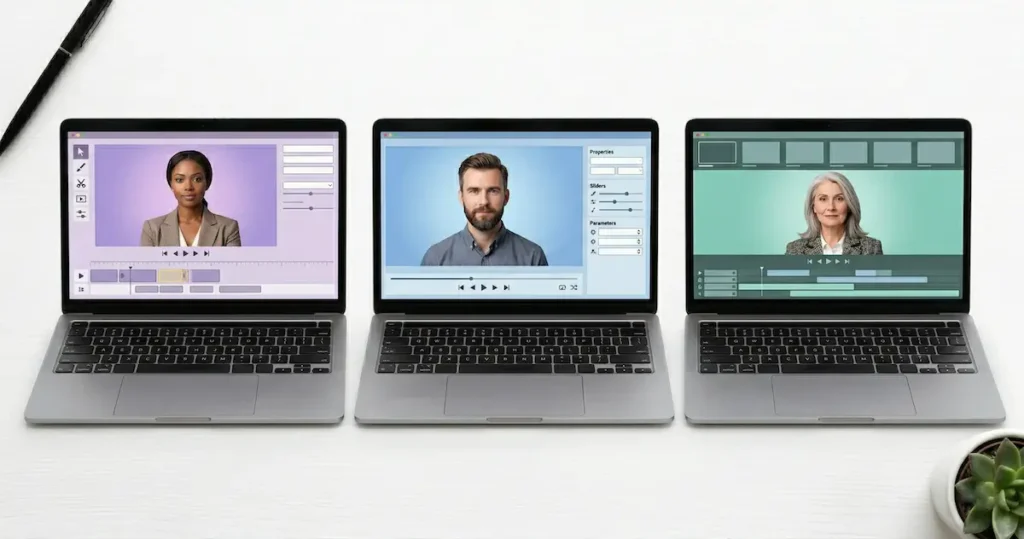
How to Create Your First HeyGen AI Video (Step-by-Step)
HeyGen AI Review: Step 1 – Sign Up and Choose a Template
Go to HeyGen and create a free account. Once you are logged in, click Create. Start with a template rather than a blank canvas, since templates give you a professional layout immediately.
Step 2: Choose Your Avatar
Click the Avatar tab and filter by style such as Business, Casual, or Public. Pick one that matches your brand voice. If you are reviewing tech products, a casual presenter will feel more natural than a formal news anchor.
Step 3: Type Your Script
Enter your text into the script box. You can also upload an audio file if you prefer to record your voice. Pro tip: click the Play Script button to hear the voice before generating. If a word sounds robotic, try changing the spelling phonetically.
Step 4: Refine in AI Studio
After the Video Agent builds your first draft, open the project in AI Studio for frame-level editing. You can adjust text, colors, timing, scene transitions, and captions. Furthermore, you can swap out stock B-roll for your own brand assets or AI-generated visuals from Sora, Kling, or Veo. Because everything is text-based, editing feels like revising a document rather than using a traditional video editor.
Step 5: Customize Visuals
Add your logo, change background colors, and insert text overlays. Keep the visual layout simple so the avatar stays the main focus.
HeyGen AI Review: Step 6 – Submit and Render
Click Submit. On paid plans, you do not need to stress about perfection before rendering. Because you have unlimited generations, you can regenerate as many times as needed. Most one to two minute videos finish rendering in five to ten minutes.

If you want to go deeper on creating video ads specifically, check out our step by step guide on how to create HeyGen video ads.
HeyGen AI Review: Troubleshooting and Limitations
The issues below are drawn from user reviews on Trustpilot and community forums to give you an honest picture of what to expect.
Lip-Sync Failures
If your script is too fast, the avatar’s lips may not keep up. To fix this, add commas or pause markers in your script. Slowing the speech delivery usually resolves the issue.
Repetitive Hand Gestures
Some avatars loop the same hand gesture in longer videos. The best fix is to cut to B-roll or branded visuals during those sections. The new Gesture Control feature also helps by letting you map specific movements to your script.
Strict Moderation
HeyGen will refuse to generate content that includes excessive profanity, sensitive political content, or copyright violations. This policy helps prevent misuse but can feel limiting for certain creative projects.
Custom Avatar Quality
The quality of your Digital Twin depends entirely on your source footage. Poor lighting or a shaky camera will produce a poor clone. Always record in good lighting with a high-quality front-facing camera.
The 97 Percent Loading Bug
Some users report that video rendering gets stuck near the end. This is usually a browser cache issue. Refreshing the page or switching to Google Chrome normally fixes it. HeyGen works best on Chrome.
Free Plan Restrictions
On the free plan, you are limited to one-minute videos, 30 or more language options, and a watermark on every export. To unlock the full feature set, upgrade to at least the Creator plan.

HeyGen AI Review: Frequently Asked Questions
HeyGen AI Review: Can You Really Make Unlimited Videos?
Yes, on the Creator plan and above. Standard avatar video generation is unlimited. However, premium features like Avatar IV and the AI Video Agent draw from a monthly premium usage allowance. For a solo human creator producing regular content, this HeyGen AI review confirms the Creator plan at 29 dollars per month is effectively unlimited for practical use.
How do I use the new AI Video Agent?
The AI Video Agent is your shortcut to a full video from a single input. You type a topic, paste a URL, or upload a document such as a PDF or creative brief. The agent then writes the script, builds a storyboard, selects visuals, and adds narration automatically. After that, you review a scene-by-scene breakdown and give plain English feedback to refine it. Finally, you open the result in AI Studio for any remaining frame-level adjustments. The Video Agent is available for trial on the Free plan and is fully included in the Creator plan and above.
How do I refine my draft in AI Studio?
AI Studio gives you frame-level control over everything the Video Agent generates. You can edit text, colors, timing, and layout by clicking any element directly. Furthermore, you can swap out stock footage for your own assets, apply color grading, add background music, and use the background remover to place your avatar into branded scenes. Because the editor is text-based, changes feel more like editing a document than using a traditional video editor.
Can I use HeyGen videos on YouTube?
Yes. On paid plans, you own the commercial rights to the videos you create. As a result, many channels are already monetized using AI avatar content.
HeyGen AI Review: Is There a Free Trial?
Yes. HeyGen offers a permanent Free plan, not just a timed trial. You get 3 videos per month to test the platform with no credit card required.
HeyGen AI Review: How Long Does Rendering Take?
For a one-minute video, expect around three to five minutes. During peak times, it may take a little longer.
HeyGen AI Review: Can You Upload Your Own Voice?
Yes. You can upload a pre-recorded MP3 or WAV file and the avatar will lip-sync to that audio. You can also clone your voice using a short recording.
Does HeyGen AI Work on Mobile?
HeyGen has a mobile app, but the editing experience is much smoother on a desktop browser. For serious production work, use a computer.
Who Is HeyGen AI Best For?
HeyGen is an excellent fit for content creators, marketers, coaches, e-commerce sellers, HR teams, and educators. If you are looking for broader tools to pair with your content workflow, our guides on why remote work is the future and the best AI tools for content creators in 2026 are worth a read.

HeyGen AI Review: Key Takeaways
- HeyGen AI turns text into video using realistic AI avatars.
- Avatar V just launched — the most realistic AI avatar model in the world, built from a 15-second clip with AI-designed looks and full voice cloning.
- The Creator Plan at 29 dollars per month now offers unlimited avatar videos with up to 30-minute duration.
- The Free Plan gives you 3 videos per month with a 1-minute cap and a watermark.
- New tools include the AI Video Agent, Face Swap AI, Gesture Control, and a Product Placement Ad Generator.
- Third-party AI models including Sora, Google Veo, Kling, and Flux are now integrated for B-roll and image generation.
- The Pro plan at 99 dollars per month and Business plan at 149 dollars per month serve teams with higher usage needs.
- Lip-sync accuracy drops with noisy audio or complex backgrounds, so clean audio is essential.

Conclusion: This HeyGen AI Review Says Yes
fter using HeyGen regularly across my own YouTube, Facebook, Instagram, TikTok, Twitter, and Pinterest channels, my honest verdict for this HeyGen AI review is yes. It is worth it, especially at the Creator plan level.
HeyGen AI Review: What Has Improved
The platform has grown into something genuinely capable. The AI Video Agent alone saves hours of production time. Combined with the brand new Avatar V engine, Gesture Control, third-party AI integrations, and unlimited video generation, this is now one of the most complete AI video tools available to solo creators. In short, it has never been better than it is right now..
What to Watch Out For
That said, it is not magic. You still need clean source footage for Custom Avatars, good audio for accurate lip-sync, and a little patience to learn the AI Studio workflow. However, if you want to produce consistent, professional-looking video content at scale without a film crew, HeyGen clearly delivers.
HeyGen AI Review: My Final Recommendation
My advice is to start with the Free Plan. Make your three free videos. If you enjoy the workflow, the Creator Plan at 29 dollars per month is currently the best value in the AI video market for independent creators.
If you are comparing other tools after reading this HeyGen AI review, our StoryShort AI faceless video review and Makereels AI review cover strong alternatives for short-form content. For AI writing to pair with your video scripts, check out our guide to AI writing tools.
Work Smarter. Live Better.
Affiliate Disclosure: This article contains affiliate links. If you purchase through my link, I may earn a small commission at no extra cost to you.
You Might Also Like:
- Synthesia AI: Is It The Best AI Video Tool?
- Synthesys AI: Realistic AI Video Made Easy
- InVideo AI: Text-to-Video Made Simple
- Creatify AI Review: How to Create High Converting Ads Fast
- Makereels AI Review: The Ultimate Guide to Viral Reels
- HeyGen vs Synthesia vs Synthesys Comparison
- Tagshop AI Tutorial: How To Make Cool UGC Ads
- What Is UGC and How to Make Money With It

Ibra A. is the founder of Remote Future, a site covering AI tools, remote work, and online business strategies. He holds a Facebook Social Media Marketing certificate from Coursera and actively tests AI tools to support independent creators and small business owners. His focus is practical, no-hype guidance for people building lean online businesses.
Our content is created using AI tools to support efficient research and writing, with human direction, verification, and editorial review by Ibra A.
AI-assisted content with human editorial oversight.
See our AI editorial policy
Content on Remote Future is created using AI tools to support efficient research and writing for remote workers and creators, followed by human edits for clarity and accuracy.
Read our AI Editorial Policy.